
Marinette, WI · Marinette County
Alcohol Beverage Server License Application
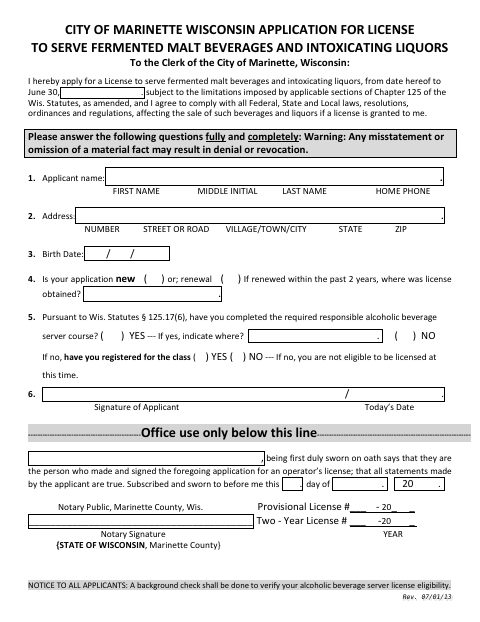
This application requests a City of Marinette license to serve fermented malt beverages and intoxicating liquors, and is filed by applicants seeking a new or renewed operator’s license.
- licensed online notary
- ~15 min average
- Notarized PDF emailed
What you’ll need
- Government-issued photo ID
- Webcam-enabled device (laptop or phone)
- This form, ready to upload as a PDF
What this form is
The two-page application collects the applicant’s identifying information, license history, and responsible beverage server course details. Applicants apply to the City Clerk for a license that runs through June 30 and agree to follow applicable laws and local regulations. The form says the City will conduct a background check and warns that a material misstatement or omission may lead to denial or revocation.
Who needs it
Anyone applying for a new or renewed City of Marinette license to serve fermented malt beverages and intoxicating liquors needs to complete this application.
How to get this notarized
- 1
Download The Application
Download the City of Marinette Alcohol Beverage Server License Application.
- 2
Fill Out The Form
Complete the applicant details, license history, and responsible beverage server course questions.
- 3
Book An Online Notary
Arrange an online notarization for the application’s oath and jurat.
- 4
Sign On Video
Sign and swear to the application’s statements during the online notary session.
- 5
Submit To The City
Submit the completed, notarized application to the City of Marinette.
Preview the form
The blank PDF straight from Marinette. Look it over, then upload your filled copy to start the notary session.

You’ll need ID and a webcam.
A licensed online notary will join you on video, verify your government-issued ID, witness your signature, and apply their seal. You’ll receive the notarized PDF by email when the session ends.
Frequently asked questions
- How do I apply for a Marinette alcohol beverage server license?
- Complete the application with your personal information, license history, and responsible beverage server course details. Sign the oath before a notary, then submit the application to the City.
- Do I need to sign this application in front of a notary?
- Yes. The application includes a subscribed-and-sworn jurat, so the applicant signs and swears to the truth of the statements before a notary.
- Can I use an online notary for this application?
- Wisconsin authorizes remote notarization by a commissioned online notary under Wis. Stat. §140.145. Confirm that the City will accept an online-notarized application; confirm with the city or village if unsure.
- What does the form say about server training?
- The application asks whether you completed the required responsible alcoholic beverage server course and includes questions about registration. The form also describes exceptions and provisional licenses.