
Kaukauna, WI · Outagamie County
Alcohol Beverage License Application
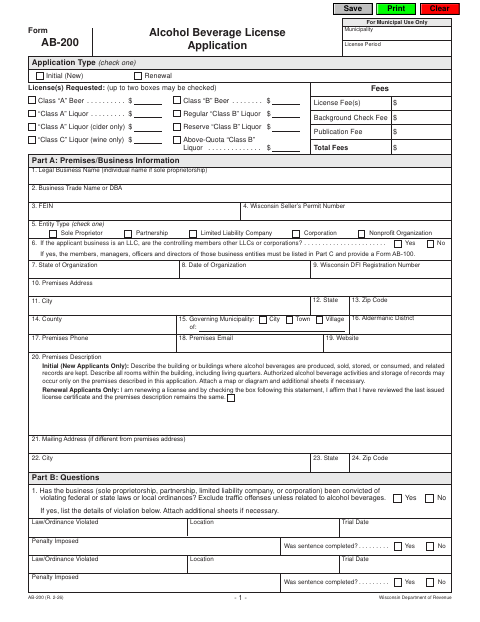
This Wisconsin Department of Revenue application lets a business request alcohol beverage licenses and provide premises, business, and individual information to the municipality where it applies.
- licensed online notary
- ~15 min average
- Notarized PDF emailed
What you’ll need
- Government-issued photo ID
- Webcam-enabled device (laptop or phone)
- This form, ready to upload as a PDF
What this form is
Use this application to request an initial or renewal alcohol beverage license and describe the business and licensed premises. The form says supplementary information may be required, and the application is not complete until that paperwork is received by the municipal clerk where the business is applying.
Who needs it
A sole proprietor or authorized representative of a partnership, corporation, nonprofit organization, or limited liability company applying for or renewing an alcohol beverage license.
Why it needs a notary
The supplied form text shows an attestation signature area for an authorized signer but no jurat or acknowledgment block; confirm notarization requirements with the municipal clerk.
How to get this notarized
- 1
Download The Application
Get Form AB-200 and review its instructions and required supplementary materials.
- 2
Complete The Application
Enter the business and premises information, answer the questions, and prepare required supplementary forms.
- 3
Book An Online Notary
If the municipal clerk confirms notarization is required and the act is eligible, book a session with a commissioned online notary.
- 4
Sign As Directed
Follow the clerk's instructions for signing and, if applicable, sign during your online notary video session.
- 5
Submit To The Municipality
Send the completed application and supplementary paperwork to the municipal clerk where you are applying.
Preview the form
The blank PDF straight from Kaukauna. Look it over, then upload your filled copy to start the notary session.

You’ll need ID and a webcam.
A licensed online notary will join you on video, verify your government-issued ID, witness your signature, and apply their seal. You’ll receive the notarized PDF by email when the session ends.
Frequently asked questions
- Who must sign the application?
- The form says a sole proprietor, one general partner, one corporate officer, or one LLC member must sign and attest to the application.
- How do I submit the completed application?
- Submit the application and required supplementary paperwork to the municipal clerk where you are applying. The form states the application is not complete until the supplementary paperwork is received.
- Do I need to have this form notarized?
- The supplied form text has an attestation signature area but no jurat or acknowledgment block. Confirm the notarization requirement with the municipal clerk before signing.
- Can I sign this form with a commissioned online notary?
- Wisconsin law, Wis. Stat. §140.145, allows remote online notarization for eligible acts by a commissioned online notary, but excludes wills, trusts, powers of attorney, and marital property agreements. Confirm with the city or village if unsure.
Alcohol Beverage License Application in other Wisconsin cities
Each city publishes its own version of this form. Pick the city where you’re filing.