
Mount Pleasant, WI · Racine County
Business and Employee License Application
This application requests a license for a business or employee engaged in selling activity in Mount Pleasant, and is filed with the Village Clerk-Treasurer.
- licensed online notary
- ~15 min average
- Notarized PDF emailed
What you’ll need
- Government-issued photo ID
- Webcam-enabled device (laptop or phone)
- This form, ready to upload as a PDF
What this form is
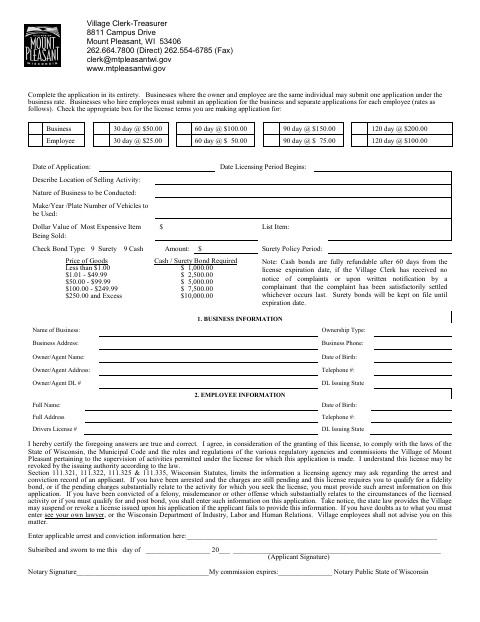
Use this application to provide business and applicant details, describe the selling activity and location, choose a license term, and report vehicle and bond information. The form instructs applicants to complete it in its entirety; businesses with employees must submit an application for the business and a separate application for each employee. The applicant certifies the information and agreement to comply with applicable laws and Village requirements under oath.
Who needs it
A business or employee applying for a license for selling activity in Mount Pleasant must complete the applicable application and provide the requested information.
Why it needs a notary
The form has a jurat stating “Subscribed and sworn to me”; the applicant signs before the notary, who signs and records the commission expiration.
How to get this notarized
- 1
Download the Application
Get the Business and Employee License Application from the Mount Pleasant website.
- 2
Complete the Form
Fill in the application, select the license term and bond type, and provide the relevant business and employee information.
- 3
Book an Online Notary
Arrange a remote notarization with a commissioned online notary before signing.
- 4
- 5
Submit to the Village
Submit the notarized application to the Village Clerk-Treasurer.
Preview the form
The blank PDF straight from Mount Pleasant. Look it over, then upload your filled copy to start the notary session.

You’ll need ID and a webcam.
A licensed online notary will join you on video, verify your government-issued ID, witness your signature, and apply their seal. You’ll receive the notarized PDF by email when the session ends.
Frequently asked questions
- How do I complete the notarized application?
- Complete the application, then sign it under oath before a notary. The notary completes the jurat, signs, and records the commission expiration.
- Do I need a separate application for each employee?
- The form says businesses that hire employees must submit an application for the business and separate applications for each employee. Businesses where the owner and employee are the same individual may submit one application under the business rate.
- Can I sign this application with an online notary?
- Wisconsin authorizes remote online notarization for its own notaries under Wis. Stat. §140.145. A commissioned online notary can notarize the sworn signature remotely; confirm with the city or village if unsure.
- What information does the application request?
- It requests license-term and bond details, selling location and activity, business and applicant information, vehicle details, and applicable arrest or conviction information.