
Neenah, WI · Winnebago County
Outdoor Extension of Retail License Application
This application requests approval to add an outdoor area to a retail Class B, Class “B,” or Class “C” licensed premise; the licensee or business applicant files it with the City of Neenah.
- licensed online notary
- ~15 min average
- Notarized PDF emailed
What you’ll need
- Government-issued photo ID
- Webcam-enabled device (laptop or phone)
- This form, ready to upload as a PDF
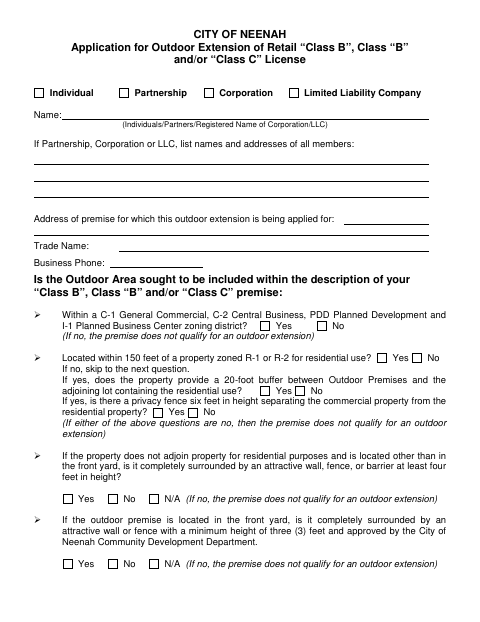
What this form is
Use this form when applying to include an outdoor area in the description of a retail Class B, Class “B,” or Class “C” licensed premise in Neenah. It asks about zoning, buffers, fences, signs, a site plan, and the planned outdoor use. Applicants also affirm the information is truthful and agree to comply with the cited ordinance terms if approved. The form notes that a license will not be issued until final inspections are complete.
Who needs it
An individual license applicant or the required partners, corporate officers, or LLC members seeking approval for an outdoor extension files this application.
Why it needs a notary
The final block is a jurat: each required applicant signer must subscribe and swear to the application before a clerk or notary public.
How to get this notarized
- 1
Download The Application
Get the City of Neenah Outdoor Extension of Retail License Application.
- 2
Complete The Form
Fill in applicant and premise details, answer the outdoor-area questions, and include the site plan.
- 3
Book An Online Notary
Arrange a remote online notarization for the application’s sworn signature block.
- 4
Sign On Video
Each required applicant signer appears before the notary and signs the application during the online session.
- 5
Submit To The City
Send the completed application and supporting materials to the City of Neenah.
Preview the form
The blank PDF straight from Neenah. Look it over, then upload your filled copy to start the notary session.

You’ll need ID and a webcam.
A licensed online notary will join you on video, verify your government-issued ID, witness your signature, and apply their seal. You’ll receive the notarized PDF by email when the session ends.
Frequently asked questions
- How do I apply for an outdoor license extension in Neenah?
- Complete the application, answer the outdoor-premise questions, include the site plan, and submit it to the City of Neenah. The form also asks about the site plan review fee and required applicant signatures.
- Do I need to sign this application in front of a notary?
- Yes. The application ends with a sworn and subscribed jurat. Each required applicant signer must sign and swear to the application before a clerk or notary public.
- Can I use a commissioned online notary for this form?
- Wisconsin authorizes remote online notarization by its own notaries under Wis. Stat. §140.145. Ask the City of Neenah whether it accepts a remotely notarized application; confirm with the city or village if unsure.
- What does the application require for the outdoor area?
- It asks about zoning, residential buffers and fencing, signs, public right-of-way obstruction, a site plan, the planned outdoor use, and other conditions. The form says an outdoor extension must meet the stated requirements to qualify.