
Douglas, WY · Converse County
New or Transfer Liquor License Application
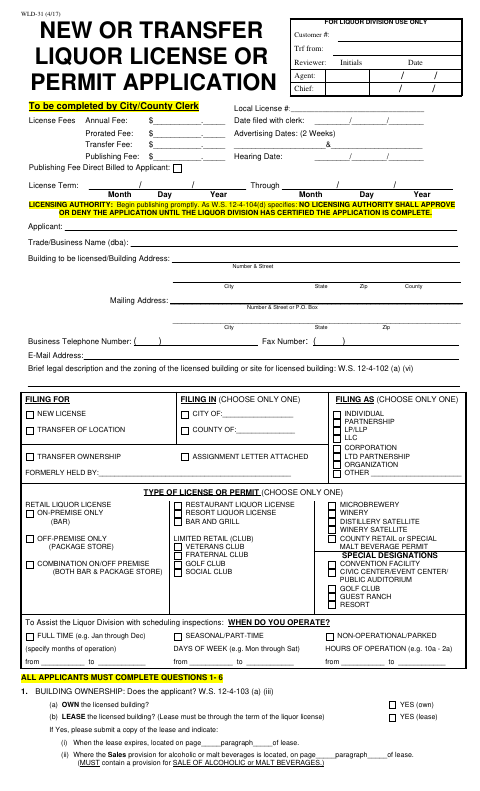
This five-page application is for individuals and organizations seeking a new or transferred liquor license or permit, and is completed for filing with the city or county licensing authority.
- licensed online notary
- ~15 min average
- Notarized PDF emailed
What you’ll need
- Government-issued photo ID
- Webcam-enabled device (laptop or phone)
- This form, ready to upload as a PDF
What this form is
The application collects details about the applicant, licensed premises, business structure, license type, and operating schedule, along with answers to questions relevant to the selected license. Applicants must include required supporting documents, which may include a financial statement, lease, restaurant drawing, or assignment form. The form is completed by the city or county clerk and includes an oath or verification signed by the applicant representatives specified in the form.
Who needs it
Individuals and organizations applying for a new liquor license or permit, transferring a license, or changing its ownership or location use this application.
How to get this notarized
- 1
Download the Application
Get the New or Transfer Liquor License or Permit Application from the City of Douglas forms page.
- 2
Complete the Applicable Sections
Enter applicant, premises, license, and operating details, answer the questions that apply, and gather required attachments.
- 3
Book an Online Notary
Arrange remote notarization for the oath or verification and confirm which applicant representatives must sign.
- 4
Sign on Video
Appear for the online notarization and sign the oath before the notary administers it.
- 5
Submit to the City
Send the completed application and supporting documents to the appropriate licensing authority following its submission instructions.
Preview the form
The blank PDF straight from Douglas. Look it over, then upload your filled copy to start the notary session.

You’ll need ID and a webcam.
A licensed online notary will join you on video, verify your government-issued ID, witness your signature, and apply their seal. You’ll receive the notarized PDF by email when the session ends.
Frequently asked questions
- How do I complete the liquor license application?
- Complete the sections that apply to your applicant type and license, gather the required attachments, then sign the oath before a notary and submit the application to the licensing authority.
- Do I need to sign the application in front of a notary?
- Yes. The form includes an oath stating that the facts are true and requires the designated applicant signers to sign and swear before a notary.
- Who must sign the oath or verification?
- The form specifies all individuals, all partners, one LLC member, two corporate officers or directors, or two club officers. It also gives an exception for a corporation whose stock is owned by one individual.
- Can I sign the oath online?
- Wyoming authorizes remote online notarization and remote ink notarization for its notaries. A commissioned online notary may notarize remotely after giving the required one-time notice to the Secretary of State.
- Where do I file the completed application?
- The form provides for filing with a city or county licensing authority and includes fields for the clerk. Confirm the proper filing office and any local submission instructions with the city if unsure.