
Glenrock, WY · Converse County
Voter Registration Application and Change Form
This voter registration application lets eligible Wyoming residents register to vote or update registration details, and applicants mailing it must sign the required oath before an oath-taking officer.
- licensed online notary
- ~15 min average
- Notarized PDF emailed
What you’ll need
- Government-issued photo ID
- Webcam-enabled device (laptop or phone)
- This form, ready to upload as a PDF
What this form is
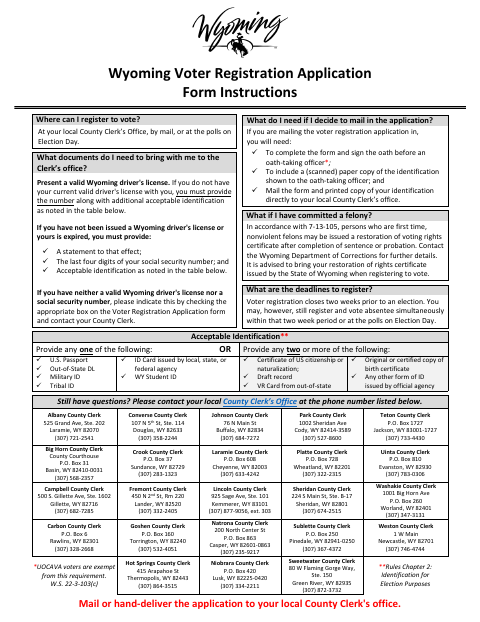
Use this application to register as a new voter or change information on an existing Wyoming voter registration, including your name, address, or political affiliation. The form instructions say to mail or hand-deliver it to your local County Clerk’s office; mailed applications must include a copy of the identification shown to the oath-taking officer. UOCAVA voters self-administer the oath and do not need an oath-taking official in the form’s signature section.
Who needs it
Wyoming residents registering to vote or changing an existing registration can use this application and submit it to their local County Clerk’s office.
How to get this notarized
- 1
Download The Application
Get the voter registration application and instructions.
- 2
Complete The Form
Fill in your registration details and review the identification instructions.
- 3
Book An Online Notary
Arrange a remote notarization for the oath-taking section, if required.
- 4
Sign On Video
Appear before the notary remotely and sign the oath as directed.
- 5
Submit To The County Clerk
Mail or hand-deliver the application to your local County Clerk; include the required ID copy if mailing.
Preview the form
The blank PDF straight from Glenrock. Look it over, then upload your filled copy to start the notary session.

You’ll need ID and a webcam.
A licensed online notary will join you on video, verify your government-issued ID, witness your signature, and apply their seal. You’ll receive the notarized PDF by email when the session ends.
Frequently asked questions
- How do I submit the voter registration application?
- The form instructions say to mail or hand-deliver the completed application to your local County Clerk’s office. A mailed application must include a copy of the identification shown to the oath-taking officer.
- Do I need to sign the application in front of a notary?
- The application requires an oath before an oath-taking officer. Its instructions allow a notary public, and eligible UOCAVA voters self-administer the oath without an official’s signature in that section.
- Can I use a commissioned online notary for the oath?
- Wyoming authorizes remote online notarization and remote ink notarization for its notaries. A commissioned online notary may perform a remote notarization after giving the required one-time notice to the Secretary of State.
- Where should I send my application?
- The form directs applicants to their local County Clerk’s office. It lists the Converse County Clerk in Douglas; confirm with the city if unsure which office serves your residence.