
Jackson, WY · Teton County
Letter of Authorization Naming Applicant as Owner’s Agent
This letter authorizes a named applicant to act as a property owner’s agent for selected Town of Jackson permit or business license applications for the listed premises.
- licensed online notary
- ~15 min average
- Notarized PDF emailed
What you’ll need
- Government-issued photo ID
- Webcam-enabled device (laptop or phone)
- This form, ready to upload as a PDF
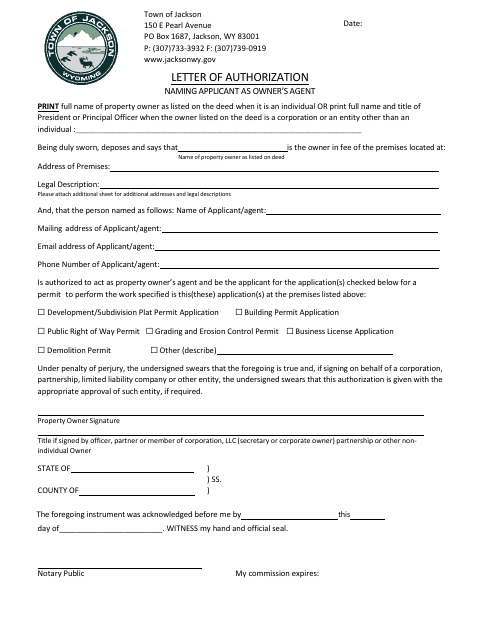
What this form is
The property owner uses this form to name an applicant as an agent for one or more listed applications, including building, demolition, grading, subdivision plat, right-of-way, and business license applications. It identifies the property, owner, and agent, and includes a declaration that the information is true and that entity approval was obtained if required. Submit it with the related application for work at the premises; attach another sheet for additional addresses or legal descriptions.
Who needs it
A property owner who wants another person to apply as their agent for one or more listed Town of Jackson permits or a business license needs this letter.
Why it needs a notary
The property owner, or an authorized entity signer, signs the sworn declaration; the form includes an acknowledgment-before-me block for the notary to complete.
How to get this notarized
- 1
Download the Form
Get the Letter of Authorization Naming Applicant as Owner’s Agent from the Town of Jackson.
- 2
Fill In the Details
Provide the owner, premises, and agent information, then check each application type covered by the authorization.
- 3
Book an Online Notary
Arrange remote notarization for the property owner or authorized entity signer.
- 4
Sign on Video
Sign the declaration during the online notary session and have the notary complete the acknowledgment section.
- 5
Submit to the City
Send the completed form with the related application to the Town of Jackson.
Preview the form
The blank PDF straight from Jackson. Look it over, then upload your filled copy to start the notary session.

You’ll need ID and a webcam.
A licensed online notary will join you on video, verify your government-issued ID, witness your signature, and apply their seal. You’ll receive the notarized PDF by email when the session ends.
Frequently asked questions
- How do I use the owner agent authorization form?
- Enter the owner and property details, identify the agent, check the applicable application types, and have the owner or authorized entity signer complete the signature and notary sections.
- Do I need to attach anything to this form?
- Attach an additional sheet if the authorization covers more property addresses or legal descriptions. The form also asks an entity signer to confirm appropriate approval when required.
- Can I have this form notarized online?
- Wyoming authorizes remote online and remote ink notarization under W.S. 32-3-111(j)-(o). A commissioned online notary may notarize remotely after giving the required one-time notice to the Secretary of State.
- Where do I submit the completed authorization?
- Submit it with the related application for work at the listed premises. For application-specific submission instructions, confirm with the city if unsure.