
Gulf Shores, AL · Baldwin County
Waiver of Defendant’s Presence and Consent to Court’s Findings and Adjudication
This form lets a defendant ask the Gulf Shores Municipal Court to proceed without the defendant present and decide the case under an attached plea and sentencing agreement.
- licensed online notary
- ~15 min average
- Notarized PDF emailed
What you’ll need
- Government-issued photo ID
- Webcam-enabled device (laptop or phone)
- This form, ready to upload as a PDF
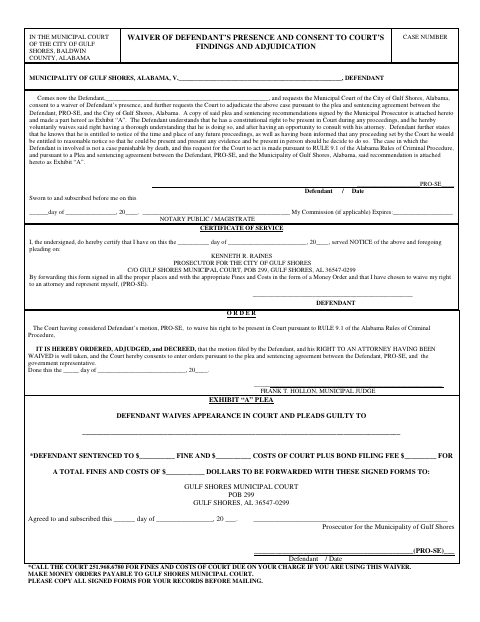
What this form is
A defendant uses this form to ask the Gulf Shores Municipal Court to waive the defendant’s presence and enter orders based on a plea and sentencing agreement attached as Exhibit A. The form includes the defendant’s statements about waiving the right to appear and a proposed court order. The form also directs the defendant to contact the court about fines and costs and to send the signed forms and required money order to the court.
Who needs it
A defendant seeking to waive an in-person appearance and request a decision under a plea and sentencing agreement with the Municipality of Gulf Shores uses this form.
Why it needs a notary
The defendant signs the waiver before the jurat marked “Sworn to and subscribed before me”; the form identifies a notary public or magistrate as the officer.
How to get this notarized
- 1
Download the Form
Download the defendant presence waiver and review its instructions and Exhibit A.
- 2
Complete the Form
Fill in the case and defendant information, and contact the court about fines and costs.
- 3
Book an Online Notary
Arrange a session with a commissioned online notary for the waiver’s jurat.
- 4
Sign on Video
Sign the waiver in the notary’s presence during the online session; do not sign the jurat beforehand.
- 5
Submit to the Court
Send the signed forms and required money order to Gulf Shores Municipal Court as directed on the form.
Preview the form
The blank PDF straight from Gulf Shores. Look it over, then upload your filled copy to start the notary session.

You’ll need ID and a webcam.
A licensed online notary will join you on video, verify your government-issued ID, witness your signature, and apply their seal. You’ll receive the notarized PDF by email when the session ends.
Frequently asked questions
- How do I submit the completed waiver?
- The form instructs you to send the signed forms and the required fines and costs as a money order to Gulf Shores Municipal Court. Call the court for the amount due and keep copies for your records.
- Do I need to sign this waiver in front of a notary?
- The waiver has a “Sworn to and subscribed before me” jurat and identifies a notary public or magistrate. The defendant signs before that officer.
- Can a commissioned online notary notarize this form?
- Alabama recognizes an out-of-state acknowledgment when it follows the law where it was taken and bears the officer’s official seal. Confirm that an online notarization is acceptable for this sworn form with the court before signing.
- What should I attach to the waiver?
- The form says a copy of the plea and sentencing recommendations signed by the Municipal Prosecutor is attached as Exhibit A. It also includes a plea and sentencing section for the prosecutor and defendant.
- Where do I confirm court-specific requirements?
- The form directs defendants to call Gulf Shores Municipal Court about fines and costs. For questions about accepting the waiver or signing requirements, confirm with the city or town if unsure.