
Gulf Shores, AL · Baldwin County
Affidavit of Substantial Hardship and Order
This form lets a person ask a circuit, district, or municipal court to waive fees or appoint counsel based on financial hardship, using income, expenses, assets, and a sworn affidavit.
- licensed online notary
- ~15 min average
- Notarized PDF emailed
What you’ll need
- Government-issued photo ID
- Webcam-enabled device (laptop or phone)
- This form, ready to upload as a PDF
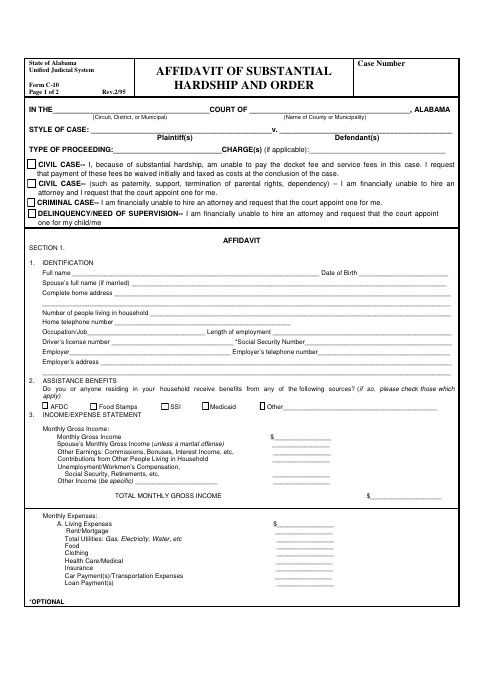
What this form is
The form includes an affidavit section for the applicant’s household, income, expenses, and assets, along with requests to waive court fees or appoint counsel. It also includes an order section for the court to approve or deny the request, set a contribution, or appoint an attorney. The packet contains related Form C-10, Form C-10A, and Form C-10B pages; the applicant completes the affidavit, and the court completes the order.
Who needs it
A person seeking a court fee waiver or appointed counsel because of financial hardship may use the affidavit section and submit it in connection with a court case.
How to get this notarized
- 1
Download the Form
Download the Affidavit of Substantial Hardship and Order form.
- 2
Fill In the Affidavit
Enter the case information and complete the identification, assistance, income, expense, and asset sections.
- 3
- 4
Sign on Video
Sign the affidavit during the online notary session; leave the court’s order section for the judge.
- 5
Submit to the Court
Submit the completed affidavit to the court handling your case and follow its instructions.
Preview the form
The blank PDF straight from Gulf Shores. Look it over, then upload your filled copy to start the notary session.

You’ll need ID and a webcam.
A licensed online notary will join you on video, verify your government-issued ID, witness your signature, and apply their seal. You’ll receive the notarized PDF by email when the session ends.
Frequently asked questions
- How do I complete the substantial hardship affidavit?
- Fill in the case details and requested financial information, sign the affidavit before a notary, judge, or clerk, and submit it with your court case. The court completes the order section.
- Do I need to sign this form in front of a notary?
- The affidavit says it must be sworn to and subscribed before a notary, judge, or clerk. Sign the affidavit in that official’s presence; do not sign it beforehand.
- Can I use a commissioned online notary?
- Alabama requires its own notaries using remote audio-video communication to be physically in Alabama. An acknowledgment taken outside Alabama may have the same effect when it follows the law where it was taken and bears the officer’s official seal. Confirm acceptance with the court.
- What happens after I submit the affidavit?
- The order section gives the court options to deny the request, find partial indigence and set a contribution, grant the request, waive prepayment of docket fees, or appoint counsel.
- Who should I ask if I am unsure where to file?
- The form has spaces for the court type and county or municipality. Contact the court handling your case; confirm with the city or town if unsure.