
Northport, AL · Tuscaloosa County
Designation of Agent Form
This form lets a property owner authorize a representative to act for them before Northport’s Board of Zoning, Planning Commission, or City Council as required by the attached application.
- licensed online notary
- ~15 min average
- Notarized PDF emailed
What you’ll need
- Government-issued photo ID
- Webcam-enabled device (laptop or phone)
- This form, ready to upload as a PDF
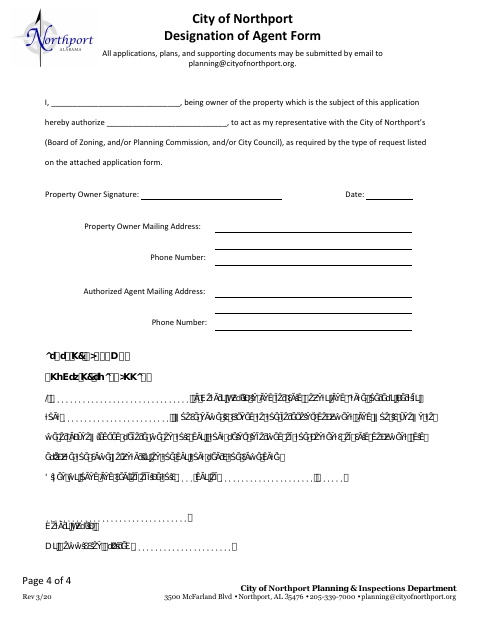
What this form is
A property owner uses this form to designate someone to represent them before the City of Northport’s Board of Zoning, Planning Commission, and/or City Council. The city requests the authorization based on the type of request listed on the attached application form. The form collects the owner’s and agent’s mailing addresses and phone numbers, and includes a notary block for the owner’s signature.
Who needs it
A property owner who wants an agent to represent them before Northport boards or officials for a request described on the attached application should complete this form.
Why it needs a notary
The form has an acknowledgment-style notary block; the property owner signs the designation and acknowledges signing it before the notary.
How to get this notarized
- 1
Download the Form
Get the Designation of Agent Form from the City of Northport.
- 2
Fill In the Details
Enter the property owner’s and agent’s information and identify the request on the attached application.
- 3
Book an Online Notary
Arrange an appointment with a commissioned online notary to acknowledge the property owner’s signature.
- 4
Sign on Video
Sign the designation during the online notary session and complete the acknowledgment.
- 5
Submit to the City
Send the completed form with the application and supporting documents to the city.
Preview the form
The blank PDF straight from Northport. Look it over, then upload your filled copy to start the notary session.

You’ll need ID and a webcam.
A licensed online notary will join you on video, verify your government-issued ID, witness your signature, and apply their seal. You’ll receive the notarized PDF by email when the session ends.
Frequently asked questions
- How do I submit the completed designation form?
- The form says applications, plans, and supporting documents may be emailed to the Planning & Inspections Department. Submit this designation with the attached application.
- Do I need to sign this form before a notary?
- Yes. The form includes a notary acknowledgment for the property owner, who signs the designation and acknowledges signing it before the notary.
- Can I use a commissioned online notary?
- An acknowledgment taken outside Alabama may have the same effect when it follows the law where it was taken and bears the officer’s official seal. Confirm the notary can complete this acknowledgment.
- Who can I name as my agent?
- The form lets the property owner name a representative to act before the Board of Zoning, Planning Commission, and/or City Council, as required by the request on the attached application.