
Chandler, AZ · Maricopa County
Administrative Design Review Submittal Checklist
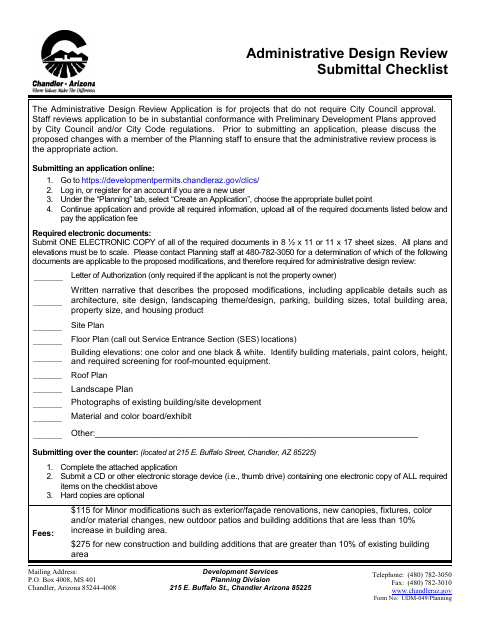
This checklist and application help property owners and applicants submit proposed project modifications for Chandler Planning staff's administrative design review.
What this form is
Use this checklist and application for proposed project modifications that do not require City Council approval and are reviewed by Planning staff. The city advises discussing the changes with Planning staff before applying to confirm administrative review is appropriate. The checklist identifies potentially required plans and supporting documents, while the application requests project, property, owner, and applicant details.
Who needs it
Property owners or their authorized applicants proposing modifications for Chandler administrative design review need this checklist and application.
How to submit it
Submit online through the city’s development permits portal, upload the required documents, and pay the application fee. For over-the-counter submission, bring an electronic copy to 215 E. Buffalo Street, Chandler, AZ 85225; hard copies are optional.
About notarization
This document is signed and dated without a notary; the applicant and, when applicable, property owner sign and date the authorization, with no sworn or notarized attachment identified.
How to submit this form
- 1
Download The Checklist
Download the Administrative Design Review Submittal Checklist and application.
- 2
Discuss The Proposed Changes
Before submitting, discuss the proposed changes with Planning staff to confirm administrative review is appropriate.
- 3
Complete The Application
Provide the requested project, property, owner, and applicant details, and sign and date the application.
- 4
Gather Required Documents
Ask Planning staff which checklist items apply, then prepare one electronic copy of each required document.
- 5
Submit To The City
Submit online through the development permits portal or over the counter at 215 E. Buffalo Street, Chandler.
Frequently asked questions
- Do I need a notary for the Administrative Design Review checklist?
- No. This document is signed and dated without a notary; the applicant and, when applicable, property owner sign and date the authorization.
- How do I submit the Administrative Design Review application?
- Submit online through Chandler's development permits portal, or submit over the counter at 215 E. Buffalo Street. Online applicants upload required documents and pay the application fee.
- What documents may be required with the application?
- Depending on the proposed modifications, the checklist may require a letter of authorization, narrative, plans, elevations, photographs, or a material and color exhibit. Contact Planning staff to determine which apply.
- Who should use this checklist?
- Property owners and applicants proposing modifications that do not require City Council approval can use it to prepare an administrative design review submission.
Need something notarized?
This Administrative Design Review Submittal Checklist doesn’t need a notary — but if you have another Chandler form that does, a commissioned online notary can help.