
Chandler, AZ · Maricopa County
Temporary Sign Permit Application
Businesses use this application to request a Chandler permit for temporary signs and provide applicant, sign-type, and display-date information.
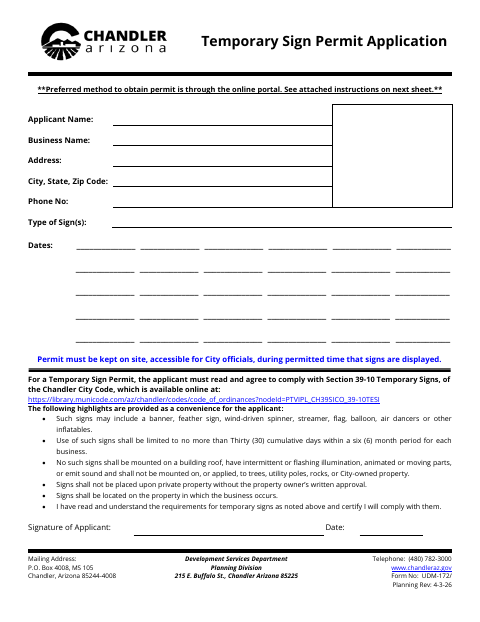
What this form is
This application is for businesses seeking a permit to display temporary signs in Chandler. It asks for applicant and business contact information, the type of sign, and the dates it will be displayed. Applicants must agree to follow the temporary-sign requirements identified on the form, including the applicable Chandler City Code section; the permit must remain accessible on site while signs are displayed.
Who needs it
A business seeking to display temporary signs in Chandler should complete the application and agree to follow the requirements listed on the form.
How to submit it
The form identifies the online portal as the preferred way to obtain the permit and provides instructions for applying through Chandler’s Development Services portal. Follow the form’s instructions to select Temporary Sign Permit and print the permit proof for the business site.
About notarization
This application is signed and dated without a notary; the applicant must keep the printed permit proof accessible at the business site.
How to submit this form
- 1
Download The Application
Download the Temporary Sign Permit Application PDF.
- 2
Complete The Application
Provide the applicant and business information, sign type, and preferred display dates.
- 3
Review And Sign
Read the temporary-sign requirements on the form, agree to comply, and sign and date the application.
- 4
Apply Through The Portal
Follow the form’s instructions to select Temporary Sign Permit in Chandler’s online Development Services portal.
- 5
Print The Permit Proof
Print the permit proof and keep it accessible at the business site while signs are displayed.
Frequently asked questions
- Do I need a notary for the Temporary Sign Permit Application?
- No. The application is signed and dated without a notary. The applicant must keep the printed permit proof accessible at the business site.
- How do I submit the Temporary Sign Permit Application?
- The form says the preferred method is the online portal. Its instructions explain how to apply through Chandler’s Development Services portal and print the permit proof.
- What information does the application request?
- It asks for applicant and business names, address, phone number, the type of sign, and display dates.
- What must the applicant agree to?
- The applicant certifies that they have read and understand the temporary-sign requirements highlighted on the form and will comply with them.
Need something notarized?
This Temporary Sign Permit Application doesn’t need a notary — but if you have another Chandler form that does, a commissioned online notary can help.