
Tucson, AZ · Pima County
Campaign Finance Independent Expenditure Reporting Form
This form reports campaign-finance independent expenditures for the 2026–2027 Tucson elections and is completed by an individual or organization making an expenditure.
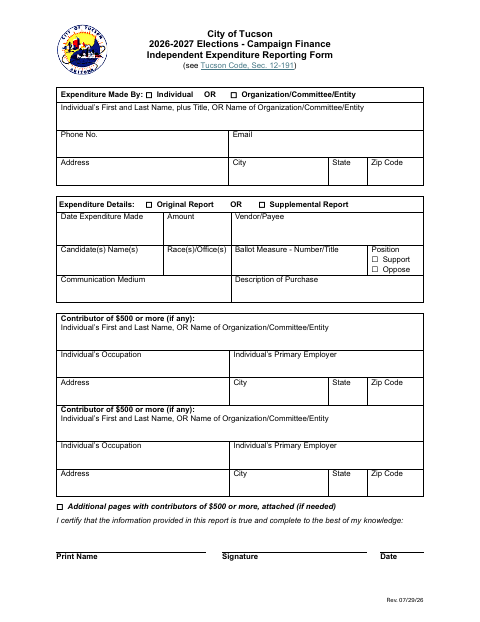
What this form is
This report records an independent expenditure connected with Tucson’s 2026–2027 elections. The filer identifies the individual or organization making the expenditure, provides expenditure and candidate, race, or ballot-measure details, and lists contributors of $500 or more. It can be marked as an original or supplemental report, and additional contributor pages may be attached if needed.
Who needs it
An individual or organization making an independent expenditure for the 2026–2027 Tucson elections can use this form to report it.
How to submit it
Submit it to the city department named on the form; check the city website for current contact details.
About notarization
This report is signed and dated without a notary; additional pages listing contributors of $500 or more may be attached if needed.
How to submit this form
- 1
Download The Form
Download the 2026–2027 Campaign Finance Independent Expenditure Reporting Form PDF.
- 2
Complete The Report
Provide the filer’s information, expenditure details, and any candidate, race, or ballot-measure information that applies.
- 3
Add Contributor Pages
List contributors of $500 or more and attach additional pages with contributor details if needed.
- 4
Sign And Submit
Certify the information, print your name, sign and date the form, then check the city website for submission details.
Frequently asked questions
- What does the independent expenditure reporting form collect?
- It requests the filer’s name and contact information, expenditure details, candidate, race, or ballot-measure information, and details for contributors of $500 or more.
- Do I need a notary for the independent expenditure reporting form?
- No. The form asks the filer to certify the information and print a name, sign, and date; it does not require a notary. Additional contributor pages may be attached if needed.
- How do I submit the independent expenditure reporting form?
- The form does not provide submission instructions or contact details. Submit it to the city department named on the form; check the city website for current contact details.
Need something notarized?
This Campaign Finance Independent Expenditure Reporting Form doesn’t need a notary — but if you have another Tucson form that does, a commissioned online notary can help.