
Pinole, CA · Contra Costa County
Subcontractor License Status Sheet
Owner-builders working with multiple contractors or subcontractors complete this sheet to provide license and business details for everyone engaged on a specified project.
What this form is
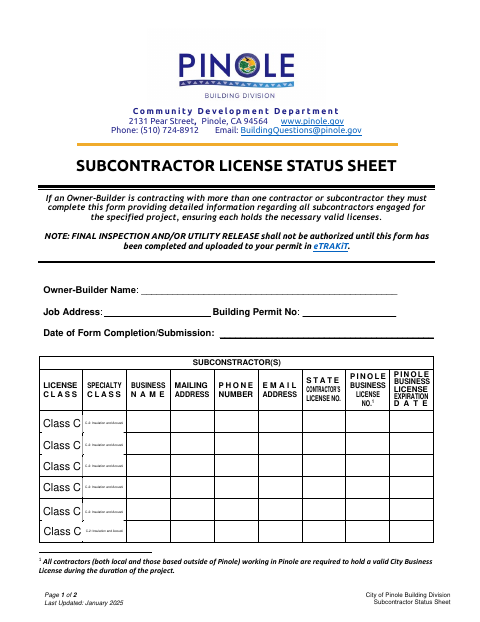
This sheet records subcontractor details for an Owner-Builder project when more than one contractor or subcontractor is engaged. It asks for the Owner-Builder’s name, job address, permit number, and completion date, plus each subcontractor’s business, contact, contractor-license, and Pinole business-license information. The completed form must be uploaded to the permit in eTRAKiT before final inspection or utility release is authorized.
Who needs it
An Owner-Builder contracting with more than one contractor or subcontractor must complete this sheet with information for all subcontractors engaged on the project.
How to submit it
Complete the sheet and upload it to your permit in eTRAKiT. The form lists the Community Development Department’s contact details for questions.
About notarization
This sheet is completed without a notary; it requests a date of completion or submission and identifies no sworn attachment or related notarized step.
How to submit this form
- 1
Download the Sheet
Download the Subcontractor License Status Sheet for your Owner-Builder project.
- 2
Complete the Form
Enter the Owner-Builder name, job address, building permit number, completion or submission date, and required information for each subcontractor.
- 3
Gather Subcontractor Details
Provide each subcontractor’s business and contact details, contractor license number, Pinole business license number, and license expiration date.
- 4
Upload to Your Permit
Upload the completed sheet to your permit in eTRAKiT.
Frequently asked questions
- Do I need a notary for the Subcontractor License Status Sheet?
- No. This sheet is completed without a notary; it requests a completion or submission date and identifies no sworn attachment or related notarized step.
- How do I submit the Subcontractor License Status Sheet?
- Upload the completed sheet to your permit in eTRAKiT. The document says final inspection or utility release will not be authorized until the form is completed and uploaded.
- Who needs to complete this sheet?
- An Owner-Builder contracting with more than one contractor or subcontractor must complete it and provide detailed information about all subcontractors engaged for the project.