
Claremont, CA · Los Angeles County
Local Register Historic Property Application
This application asks property owners or their authorized representatives to provide historical, architectural, and property information when requesting that a resource be considered for Claremont’s Register of Structures of Historical and Architectural Merit.
- California-licensed notary
- ~15 min average
- Notarized PDF emailed
What you’ll need
- Government-issued photo ID
- Webcam-enabled device (laptop or phone)
- This form, ready to upload as a PDF
What this form is
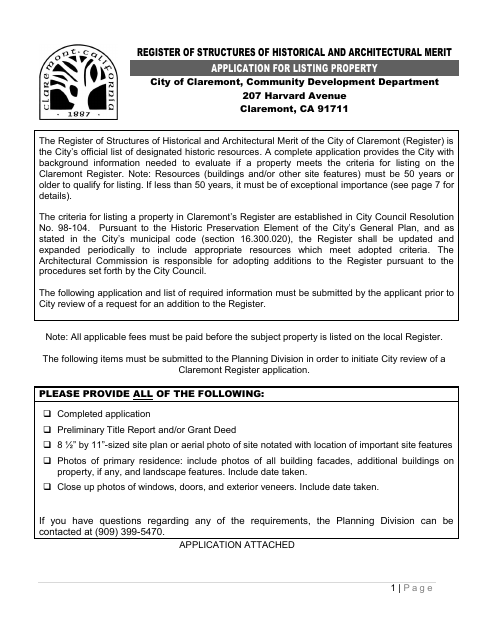
The application gives the City information to evaluate whether a property meets the criteria for inclusion on its Register of Structures of Historical and Architectural Merit. The City asks applicants to submit it with ownership documentation, a site plan or annotated aerial photo, and dated property photographs before review begins. Applicants must also explain how the resource meets at least one listing criterion; the form notes that resources generally must be 50 years or older unless exceptionally important.
Who needs it
Property owners or their representatives seeking to have a Claremont property considered for the local Register must complete the application and provide the requested supporting materials.
Why it needs a notary
The form has a “Subscribe and sworn to me” jurat with a City Clerk or Notary Public signature line; the property owner or owners signing the certification appear before the notary.
How to get this notarized
- 1
Download The Application
Get the Local Register application and review its instructions and required-submission checklist.
- 2
Fill Out The Form
Provide applicant, owner, and property details; complete the research and criteria sections; gather the requested documents and dated photos.
- 3
Book An Online Notary
Check the form’s jurat requirements and arrange notarization with a commissioned online notary if appropriate.
- 4
- 5
Submit To The City
Send the completed application, supporting materials, and applicable fee to the Planning Division.
Preview the form
The blank PDF straight from Claremont. Look it over, then upload your filled copy to start the notary session.

You’ll need ID and a webcam.
A licensed California online notary will join you on video, verify your government-issued ID, witness your signature, and apply their seal. You’ll receive the notarized PDF by email when the session ends.
Frequently asked questions
- How do I complete the historic property application?
- Fill in the applicant, owner, and property details; explain the resource’s history and how it meets a listing criterion; gather the required ownership documents, plan, and dated photos; then submit the application and fee to the Planning Division.
- Do I need to notarize this application?
- The form includes a “Subscribe and sworn to me” jurat and a City Clerk or Notary Public signature line. The property owner or owners signing the certification should appear before the notary for the oath.
- Can I use an online notary for this California form?
- California notaries cannot perform remote online notarization until the Secretary of State certifies the technology or 2030. California recognizes out-of-state notarizations under Civil Code §1189(b); confirm with the city if unsure.
- What documents and photos does the city request?
- The form lists a preliminary title report and/or grant deed, an 8½-by-11-inch site plan or annotated aerial photo, and dated photos of building facades, other buildings, landscape features, and close-ups of windows, doors, and exterior veneers.