
West Covina, CA · Los Angeles County
Administrative Permit for Minor Wireless Facility Application
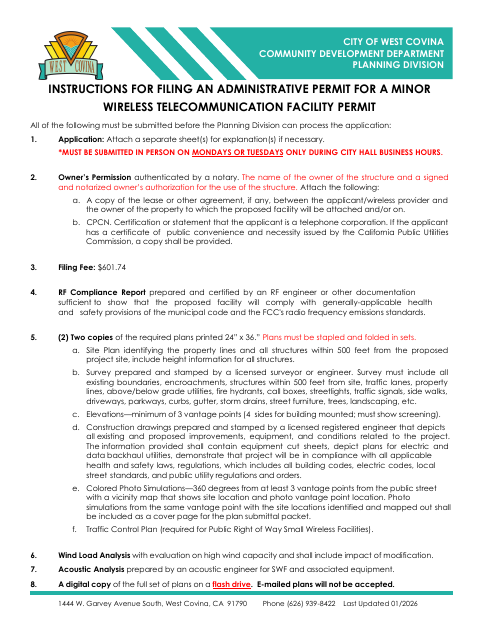
This application is for applicants seeking a West Covina administrative permit for a minor wireless facility and includes the structure owner’s notarized permission for use of the structure.
- California-licensed notary
- ~15 min average
- Notarized PDF emailed
What you’ll need
- Government-issued photo ID
- Webcam-enabled device (laptop or phone)
- This form, ready to upload as a PDF
What this form is
The Planning Division requires this application and supporting materials before it can process an administrative permit for a minor wireless telecommunications facility. The packet requests project and applicant details, the structure owner’s notarized permission, a filing fee, technical reports, and plans. The form says applications must be submitted in person on Mondays or Tuesdays during City Hall business hours; the checklist also calls for a digital copy of the plans on a flash drive.
Who needs it
Wireless facility applicants seeking a West Covina administrative permit need this application and permission notarized by the owner of the support structure.
Why it needs a notary
The structure owner’s permission must be notarized; the form does not specify a jurat or acknowledgment block, and the owner signs the authorization.
How to get this notarized
- 1
Download The Application
Get the Administrative Permit for Minor Wireless Facility Application and review the filing instructions and checklist.
- 2
Complete The Form
Provide project, applicant, and structure owner information, and gather the required supporting documents and plans.
- 3
Book An Online Notary
Arrange notarization for the structure owner’s permission using an available commissioned online notary.
- 4
Sign On Video
The structure owner completes the notarization by signing before the notary during the online session.
- 5
Submit To The City
Submit the application in person on Monday or Tuesday during City Hall business hours, with the required materials.
Preview the form
The blank PDF straight from West Covina. Look it over, then upload your filled copy to start the notary session.

You’ll need ID and a webcam.
A licensed California online notary will join you on video, verify your government-issued ID, witness your signature, and apply their seal. You’ll receive the notarized PDF by email when the session ends.
Frequently asked questions
- How do I get the structure owner’s permission notarized?
- The structure owner signs the authorization before a notary. California notaries cannot perform remote online notarization until the Secretary of State certifies the technology or 2030; California recognizes out-of-state notarizations under Civil Code §1189(b).
- Do I need the structure owner’s permission notarized?
- Yes. The form states that the owner’s permission must be notarized or the Planning Division will not accept the application.
- Can I submit the application online?
- The form says applications must be submitted in person on Mondays or Tuesdays during City Hall business hours. It also requires a digital copy of the plans on a flash drive; emailed plans are not accepted.
- What does the owner sign?
- The owner certifies under penalty of perjury that they own the wireless facility support structure and grant permission for its use. If unsure about submission details, confirm with the city.
Other forms in West Covina
Second Unit Review (SUR) Application
West Covina
Administrative Permit Application for Non-Residential and Multi-Family Zones
West Covina
Administrative Permit (R-1) Application
West Covina
Art in Public Places Application
West Covina
Conditional Use Permit Application
West Covina
Minor Modification Application
West Covina