
Brea, CA · Orange County
Authorization for Release of Protected Health Information
This authorization lets a patient or authorized representative request the release of a Brea Fire Department Personal Care Report and identify who may receive it.
- California-licensed notary
- ~15 min average
- Notarized PDF emailed
What you’ll need
- Government-issued photo ID
- Webcam-enabled device (laptop or phone)
- This form, ready to upload as a PDF
What this form is
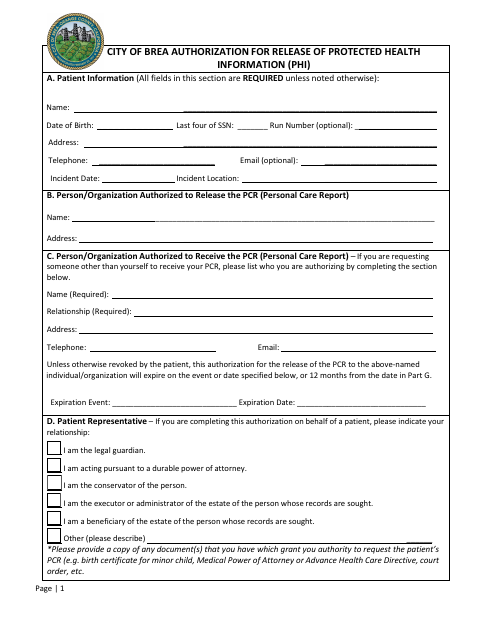
Use this form to authorize the City of Brea to use or disclose a Patient Care Report related to emergency medical services provided by the Brea Fire Department. Complete it when requesting the report for yourself or authorizing another person or organization to receive it, and provide supporting documents if you are acting as a patient representative. The form requires identity verification; notarization is an option when photo identification is not attached or specified identification is unavailable.
Who needs it
A patient requesting a Brea Fire Department Patient Care Report, or a representative requesting it on the patient’s behalf, uses this form to authorize its release.
Why it needs a notary
The form has an acknowledgment certificate, and the patient or authorized representative signs the authorization; notarization is requested when photo identification is not attached or specified ID is unavailable.
How to get this notarized
- 1
Download the Authorization
Download the City of Brea Authorization for Release of Protected Health Information form.
- 2
Fill In the Required Sections
Provide patient details, identify the authorized recipient and records, state the purpose, and complete the signature and identity-verification sections.
- 3
Book an Online Notary
If notarization is needed, book a session with a commissioned online notary and ask the City about acceptance before proceeding.
- 4
Sign During the Video Session
Follow the notary’s instructions and sign the authorization during the video session if the notary confirms the service can be provided.
- 5
Submit to the City
Send the completed form and supporting documents through the City’s public-records request page or to the City Clerk at the listed address.
Preview the form
The blank PDF straight from Brea. Look it over, then upload your filled copy to start the notary session.

You’ll need ID and a webcam.
A licensed California online notary will join you on video, verify your government-issued ID, witness your signature, and apply their seal. You’ll receive the notarized PDF by email when the session ends.
Frequently asked questions
- How do I get my Brea Patient Care Report released?
- Complete the authorization, identify the records and recipient, and provide the required identity verification and any supporting authority documents. Submit the form and supporting documents using one of the City’s listed options.
- Do I need to notarize this authorization?
- Not necessarily. The form offers photo identification as an identity-verification option. It says a notary is required if the patient’s report details differ from the photo ID and two forms of photo ID are unavailable; notarization is also an option when no photo ID is attached.
- Can I notarize this form online in California?
- California notaries cannot perform remote online notarization until the Secretary of State certifies the technology or 2030. California recognizes out-of-state notarizations under Civil Code §1189(b). Ask the City whether it will accept your notarized form; confirm with the city if unsure.
- Who can sign the release authorization?
- The patient can sign, or a representative can complete it by identifying their relationship to the patient. The form asks representatives to provide copies of documents showing their authority to request the Patient Care Report.