
Cupertino, CA · Santa Clara County
Advance Deposit Hardship Waiver Form
This form lets a person request a waiver of an advance deposit for hardship reasons and is filed with the Cupertino Office of the City Clerk for review.
- California-licensed notary
- ~15 min average
- Notarized PDF emailed
What you’ll need
- Government-issued photo ID
- Webcam-enabled device (laptop or phone)
- This form, ready to upload as a PDF
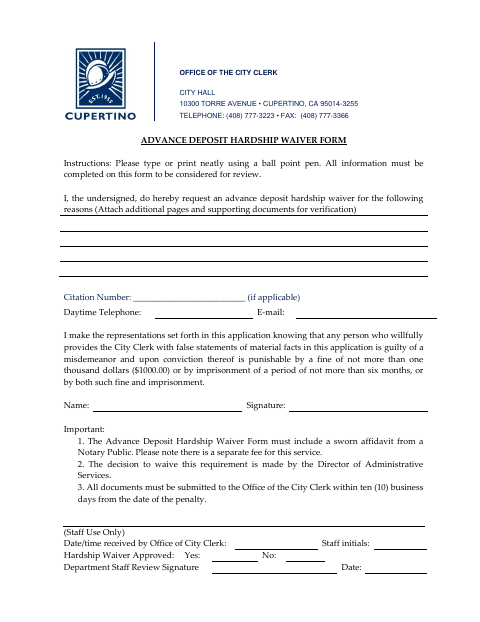
What this form is
Use this form to ask the City of Cupertino to waive an advance deposit because of hardship. The applicant must complete all information, provide a citation number if applicable, and attach any additional pages and supporting documents needed to verify the request. The form also requires a sworn affidavit from a Notary Public. Submit the documents to the Office of the City Clerk within ten business days from the date of the penalty.
Who needs it
A person seeking an advance deposit hardship waiver from the City of Cupertino must complete this form and provide supporting documents for verification.
Why it needs a notary
The form has no printed jurat or acknowledgment block; it requires a sworn affidavit from a Notary Public, and the applicant signs the application and affidavit before the notary.
How to get this notarized
- 1
Download The Form
Get the Advance Deposit Hardship Waiver Form from the City of Cupertino.
- 2
Complete The Application
Type or print neatly, complete all information, and provide a citation number if applicable.
- 3
Gather Supporting Documents
Attach additional pages and supporting documents to verify the hardship request.
- 4
Book An Online Notary
Arrange the sworn affidavit required by the form with a commissioned online notary.
- 5
Sign Before The Notary
Sign the application and sworn affidavit as directed during the notarization.
- 6
Submit To The City
Send all documents to the Office of the City Clerk within ten business days from the date of the penalty.
Preview the form
The blank PDF straight from Cupertino. Look it over, then upload your filled copy to start the notary session.

You’ll need ID and a webcam.
A licensed California online notary will join you on video, verify your government-issued ID, witness your signature, and apply their seal. You’ll receive the notarized PDF by email when the session ends.
Frequently asked questions
- How do I submit the advance deposit hardship waiver?
- Complete the form, attach any supporting pages and documents, and submit everything to the Office of the City Clerk within ten business days from the date of the penalty.
- Do I need a notary for this hardship waiver form?
- Yes. The form says the application must include a sworn affidavit from a Notary Public and notes that a separate fee applies for this service.
- Can I use an online notary for the sworn affidavit?
- California notaries cannot perform remote online notarization until the Secretary of State certifies the technology, or 2030. California recognizes out-of-state notarizations under Civil Code §1189(b); confirm with the city if unsure.
- What happens after I submit the request?
- The Director of Administrative Services makes the decision on whether to waive the requirement. City staff also have fields on the form for review and approval.