
Los Altos Hills, CA · Santa Clara County
Supplemental Documents Index
Applicants use this checklist to identify supplemental documents included in a building permit submission or resubmission to the Town of Los Altos Hills.
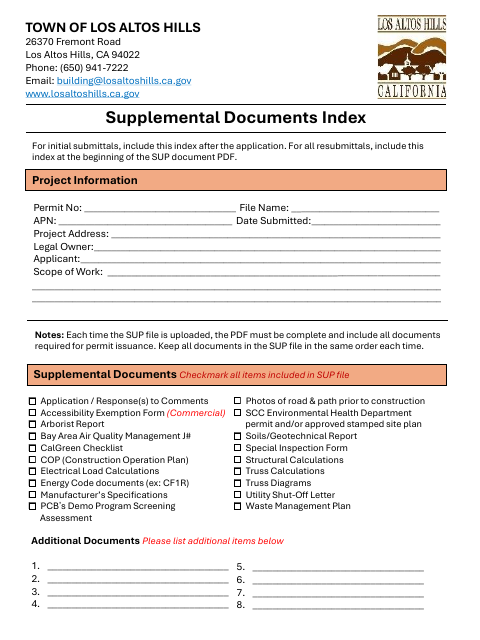
What this form is
The Supplemental Documents Index records project information and lets applicants check off documents included in the supplemental document file. The town says to include it after the application for an initial submittal, and at the beginning of the supplemental document PDF for resubmittals. It asks for permit and project details, a checklist of included materials, and space to list additional items.
Who needs it
Applicants submitting or resubmitting building permit materials to the Town of Los Altos Hills use this index to organize the supplemental document file.
How to submit it
For an initial submittal, include the index after the application; for resubmittals, put it at the beginning of the supplemental document PDF. Each uploaded file must be complete and keep documents in the same order.
About notarization
This index is completed without a notary; it has no sworn attachment or notary step, and the submitter fills in the project information and checklist.
How to submit this form
- 1
Download The Index
Download the Supplemental Documents Index PDF for your building permit submission.
- 2
Complete Project Information
Fill in the permit number, file name, APN, submission date, project address, owner, applicant, and scope of work.
- 3
Gather And Check Documents
Check the supplemental documents included in your file and list any additional items.
- 4
Include And Upload The File
For an initial submittal, place the index after the application. For a resubmittal, put it at the beginning of the supplemental document PDF.
Frequently asked questions
- What is the Supplemental Documents Index for?
- It records project information and helps applicants check off the supplemental documents included in a building permit submission or resubmission.
- When should I include the index?
- For an initial submittal, include it after the application. For a resubmittal, place it at the beginning of the supplemental document PDF.
- Do I need a notary for the Supplemental Documents Index?
- No. This index has no notary or sworn-document step; the submitter fills in the project information and checklist.
- How do I submit the Supplemental Documents Index?
- Include it after the application for an initial submittal, or at the beginning of the supplemental document PDF for a resubmittal. Upload a complete file with documents kept in the same order.