
Milpitas, CA · Santa Clara County
Occupancy Permit Application
Milpitas business operators use this application to provide information about their business and location when requesting an occupancy permit.
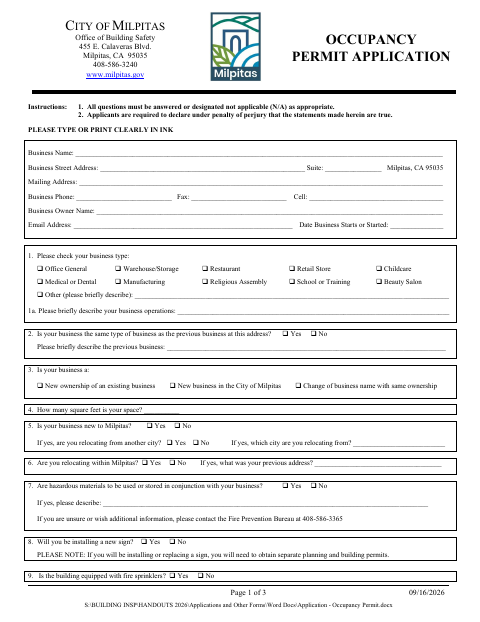
What this form is
The application collects business, owner, and location details, along with information about operations, space size, fire sprinklers, hazardous materials, construction, and wastewater discharge. The city uses the answers to review an occupancy permit request; the form says required agency clearances must be submitted before a Certificate of Occupancy can be issued. It also lists permit fees and asks the applicant, who must be the business operator, to certify and sign.
Who needs it
The operator of a business at a Milpitas location should complete this application when requesting an occupancy permit.
How to submit it
Submit it to the city department named on the form; check the city website for current contact details.
About notarization
This application is signed without a notary; the signer declares the statements true under penalty of perjury and signs and dates the form.
How to submit this form
- 1
Download The Application
Download the Occupancy Permit Application PDF.
- 2
Complete The Form
Answer all questions or mark them not applicable, and provide the requested business, location, operations, and wastewater information.
- 3
Gather Required Clearances
If the form indicates agency permits or clearances are required, submit the appropriate clearances before a Certificate of Occupancy can be issued.
- 4
Sign And Submit
The business operator signs and dates the application. Submit it to the city department named on the form; check the city website for current contact details.
Frequently asked questions
- What does the Milpitas Occupancy Permit Application ask for?
- It asks for business and owner details, the business location and type, information about the space and operations, and answers about construction, clearances, and wastewater discharge.
- Who should sign the occupancy permit application?
- The form states that the applicant shall be the operator of the business. The applicant provides a printed name and title, then signs and dates the application.
- Do I need a notary for the Milpitas Occupancy Permit Application?
- No. This application is signed without a notary. The signer declares the statements true under penalty of perjury and signs and dates the form.
- How do I submit the Milpitas Occupancy Permit Application?
- Submit it to the city department named on the form; check the city website for current contact details.
Need something notarized?
This Occupancy Permit Application doesn’t need a notary — but if you have another Milpitas form that does, a commissioned online notary can help.