
Sebastopol, CA · Sonoma County
Read and Transfer Services for Property Owners and Managers
Property owners and managers use this form to authorize automatic, phone-based, or canceled read-and-transfer utility service for specified addresses.
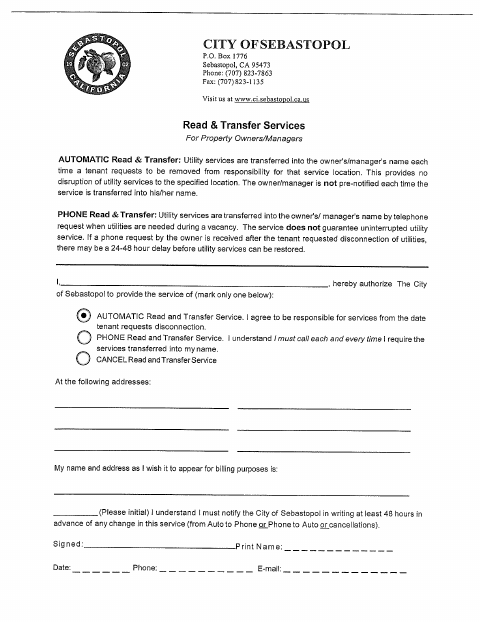
What this form is
This form lets a property owner or manager authorize automatic read-and-transfer service, phone-based service, or cancellation for specified addresses. Automatic service transfers utility responsibility when a tenant requests removal; phone-based service requires the owner or manager to call when service is needed during a vacancy. The form asks for the service choice, service addresses, billing name and address, initials, signature, date, phone number, and email.
Who needs it
Property owners or managers who want to authorize or cancel read-and-transfer utility service for one or more specified addresses need this form.
How to submit it
Submit it to the city department named on the form; check the city website for current contact details.
About notarization
This document is signed without a notary; no notarized or sworn attachment is identified, so the signer just signs and dates it.
How to submit this form
- 1
Download The Form
Download the Read and Transfer Services form.
- 2
Complete The Form
Choose automatic service, phone service, or cancellation; enter the service addresses and billing details, then sign and date.
- 3
Gather Attachments
The form does not identify any attachments to gather.
- 4
Submit To The City
Submit it to the city department named on the form; check the city website for current contact details.
Frequently asked questions
- What does the Read and Transfer Services form authorize?
- It authorizes automatic or phone-based read-and-transfer utility service, or cancellation, for specified addresses.
- Who should complete this form?
- A property owner or manager can complete the form to select a service option and provide the addresses and billing contact information.
- Do I need a notary for the Read and Transfer Services form?
- No. This document is signed without a notary, and it identifies no notarized or sworn attachment; the signer just signs and dates it.
- How do I submit the Read and Transfer Services form?
- The form does not state how to submit it. Submit it to the city department named on the form; check the city website for current contact details.