
Monument, CO · El Paso County
Solicitor’s License Application Affidavit
This two-page application and affidavit is for people representing a company who want to apply to the Town of Monument for a solicitor’s license.
- licensed online notary
- ~15 min average
- Notarized PDF emailed
What you’ll need
- Government-issued photo ID
- Webcam-enabled device (laptop or phone)
- This form, ready to upload as a PDF
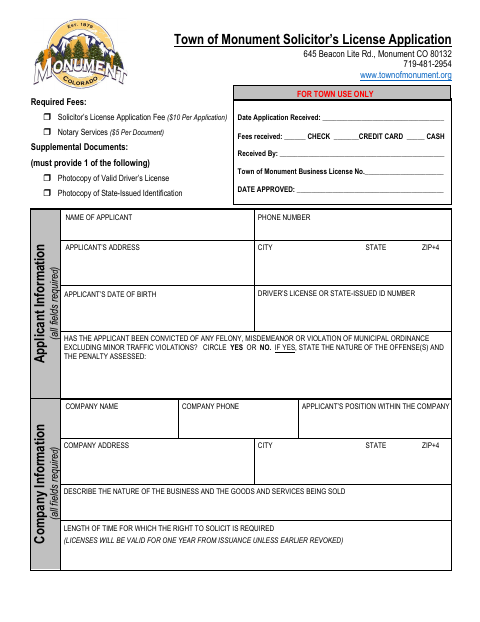
What this form is
The application collects applicant and company details, information about the goods or services being sold, and required vehicle and product information for Town use. Applicants affirm that their statements are true and complete, authorize a background investigation, and agree to comply with Monument Municipal Code Chapter 5.56. The form directs applicants to sign the affidavit in the presence of a notary as part of the solicitor’s license application.
Who needs it
A person applying to the Town of Monument for a solicitor’s license on behalf of a company needs to complete the application and applicant affidavit.
How to get this notarized
- 1
Download the Application
Download the Town of Monument solicitor’s license application and affidavit.
- 2
Complete the Application
Fill in the applicant and company information, business details, and required vehicle information. Include one required identification photocopy.
- 3
Book an Online Notary
Book a session with a commissioned online notary and have your completed application and identification ready.
- 4
- 5
Submit to the Town
Submit the notarized application and required supplemental document to the Town of Monument.
Preview the form
The blank PDF straight from Monument. Look it over, then upload your filled copy to start the notary session.

You’ll need ID and a webcam.
A licensed online notary will join you on video, verify your government-issued ID, witness your signature, and apply their seal. You’ll receive the notarized PDF by email when the session ends.
Frequently asked questions
- How do I get the solicitor’s license affidavit notarized?
- Complete the application, then book a session with a commissioned online notary. Sign the affidavit during the video session when instructed, and submit the completed application to the Town of Monument.
- Do I need to sign the affidavit in front of a notary?
- Yes. The form says the applicant affidavit must be completed in the presence of a notary public and that the applicant’s signature must be witnessed by a notary.
- Can I use an online notary for this form?
- Colorado law authorizes remote online notarization by Colorado notaries under C.R.S. §24-21-514.5. Check with the Town of Monument about its submission requirements before you book.
- What should I bring to my online notarization?
- Have the completed application available and a valid identification document ready. The form requires a photocopy of a valid driver’s license or state-issued identification as a supplemental document.
- What if I am unsure whether remote notarization is accepted?
- The form does not specify how remotely notarized applications must be submitted. Confirm with the city or town if unsure, and ask the Town of Monument about its requirements.