
Crested Butte, CO · Gunnison County
Statement of Authority
This two-page Statement of Authority identifies an entity and the person authorized to sign documents affecting its real property, for recording with the Town of Crested Butte.
- licensed online notary
- ~15 min average
- Notarized PDF emailed
What you’ll need
- Government-issued photo ID
- Webcam-enabled device (laptop or phone)
- This form, ready to upload as a PDF
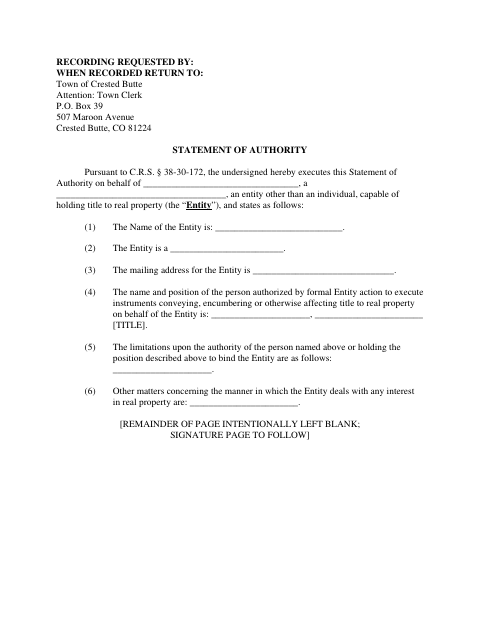
What this form is
The form states an entity’s name, type, mailing address, and the name and position of the person authorized to sign instruments affecting title to its real property. It also provides space to disclose limits on that person’s authority and other matters about the entity’s dealings with real property. The form cites C.R.S. § 38-30-172 and directs that the recorded document be returned to the Town Clerk.
Who needs it
An entity capable of holding title to real property uses this form to state who may sign instruments affecting its property and disclose any limits on that authority.
Why it needs a notary
The form has an acknowledgment block; the entity representative named as signing on its behalf acknowledges the Statement of Authority before the notary.
How to get this notarized
- 1
Download The Form
Get the Town of Crested Butte Statement of Authority form.
- 2
Fill In Entity Details
Enter the entity’s information, the authorized representative’s name and position, and any stated authority limits.
- 3
Book An Online Notary
Schedule an appointment with a commissioned online notary for the acknowledgment.
- 4
Sign On Video
The entity representative signs and acknowledges the statement during the online notarization session.
- 5
Submit For Recording
Submit the completed statement for recording and follow the form’s direction to return it to the Town Clerk.
Preview the form
The blank PDF straight from Crested Butte. Look it over, then upload your filled copy to start the notary session.

You’ll need ID and a webcam.
A licensed online notary will join you on video, verify your government-issued ID, witness your signature, and apply their seal. You’ll receive the notarized PDF by email when the session ends.
Frequently asked questions
- How do I get this Statement of Authority notarized online?
- Complete the form, then book an appointment with a commissioned online notary. The representative signs and acknowledges the statement during a video session.
- Do I need to sign this form in front of a notary?
- Yes. The form includes an acknowledgment stating that the entity representative acknowledged the Statement of Authority before a notary.
- What information does the form ask for?
- It asks for the entity’s name, type, and mailing address; the authorized person’s name and position; any limits on that person’s authority; and other matters concerning the entity’s real-property interests.
- Can a commissioned online notary notarize this Colorado form?
- Colorado authorizes its notaries to perform remote online notarizations under C.R.S. § 24-21-514.5. C.R.S. § 24-21-511 recognizes notarial acts performed by a notary public or other authorized officer of another state. Confirm with the city or town if unsure.
Other forms in Crested Butte
Statement of Authority in other Colorado cities
Each city publishes its own version of this form. Pick the city where you’re filing.