
Palisade, CO · Mesa County
Medical Marijuana License Renewal Application
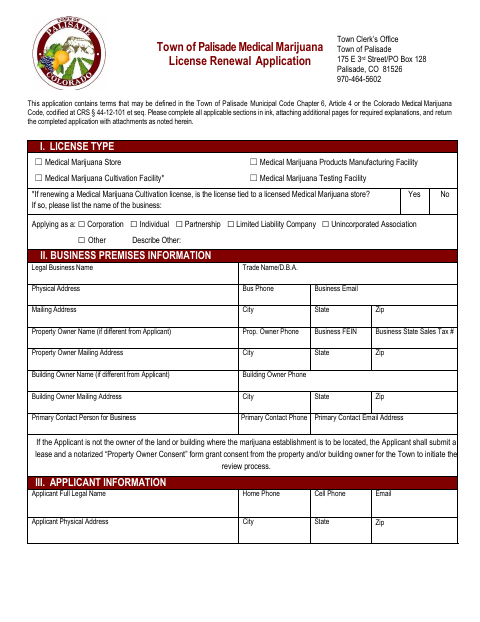
This application is for a business renewing a Town of Palisade medical marijuana license and provides the town with business, applicant, ownership, and licensing information for review.
- licensed online notary
- ~15 min average
- Notarized PDF emailed
What you’ll need
- Government-issued photo ID
- Webcam-enabled device (laptop or phone)
- This form, ready to upload as a PDF
What this form is
The application lets a business identify the medical marijuana license it is renewing and provide information about its premises, applicants, owners, other licenses, and relevant disclosures. The business submits the completed application and required attachments to the Town Clerk’s Office for departmental review and Town Board approval. The form also includes an owner’s sworn statement that the application and attachments are true, correct, and complete.
Who needs it
A business seeking to renew a Town of Palisade medical marijuana license must complete the applicable sections and provide the requested information and attachments.
Why it needs a notary
The form includes a sworn and acknowledged jurat block for the owner signing the application’s truthfulness statement, who must sign before the notary.
How to get this notarized
- 1
Download The Renewal Application
Get the Town of Palisade Medical Marijuana License Renewal Application and review its instructions and attachment requirements.
- 2
Complete Applicable Sections
Fill in the business, applicant, ownership, licensing, and disclosure information. Add separate sheets where the form requests more space.
- 3
Book An Online Notary
Arrange a remote notarization for the owner’s sworn statement and, if applicable, the separate Property Owner Consent form.
- 4
Sign During The Video Session
Wait to sign the statement until the commissioned online notary instructs you during the video appointment.
- 5
Submit The Application To The Town
Return the completed application and required attachments to the Town Clerk’s Office using its current submission instructions.
Preview the form
The blank PDF straight from Palisade. Look it over, then upload your filled copy to start the notary session.

You’ll need ID and a webcam.
A licensed online notary will join you on video, verify your government-issued ID, witness your signature, and apply their seal. You’ll receive the notarized PDF by email when the session ends.
Frequently asked questions
- How do I complete the notarized part of the renewal application?
- Complete the application first, but wait to sign the owner’s statement until you meet with a commissioned online notary. The form’s notary block records the oath and acknowledgment.
- Do I need to notarize the entire application?
- The form includes a notary block for the owner’s sworn statement that the application and attachments are true, correct, and complete. It separately says a notarized Property Owner Consent form is required if the applicant does not own the premises.
- Can I sign this application with an online notary?
- Colorado law authorizes remote online notarization by a commissioned online notary under C.R.S. §24-21-514.5. Check that the Town of Palisade will accept the remotely notarized application.
- Where do I submit the completed renewal application?
- The form directs applicants to return the completed application and attachments to the Town Clerk’s Office at the address listed on the form. Confirm current submission instructions with the Town.
- What if I am unsure which sections or attachments apply?
- The form asks applicants to complete all applicable sections and include required attachments. Contact the Town Clerk’s Office, and confirm with the city or town if unsure.