
Palisade, CO · Mesa County
Retail Marijuana New License Application
This eight-page application is for individuals and business entities seeking a new Palisade retail marijuana license and includes applicant attestations and property owner consent.
- licensed online notary
- ~15 min average
- Notarized PDF emailed
What you’ll need
- Government-issued photo ID
- Webcam-enabled device (laptop or phone)
- This form, ready to upload as a PDF
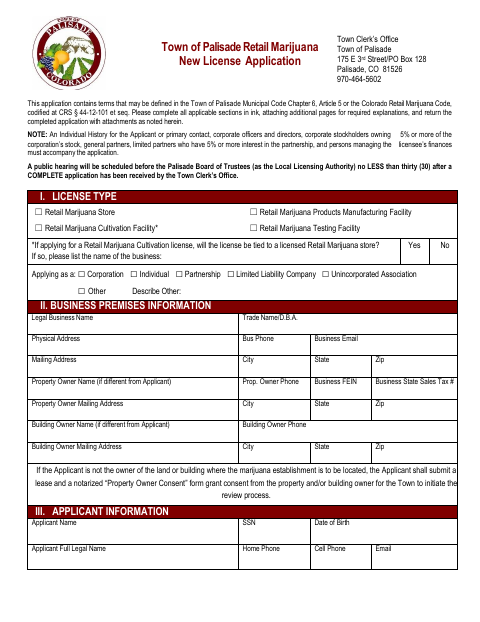
What this form is
Use this application to request a new Town of Palisade license for a retail marijuana store, cultivation facility, products manufacturing facility, or testing facility. Applicants provide business, ownership, employee, and premises details, submit required attachments, and complete the applicable oath; a property owner must also complete the consent section when required. The Town Clerk’s Office schedules a public hearing after receiving a complete application, and the form includes a checklist of supporting materials and fees.
Who needs it
Individuals or entities applying for a new Palisade retail marijuana license need this form, with property owner consent also required when the applicant does not own the premises.
How to get this notarized
- 1
Download The Application
Get the Town of Palisade Retail Marijuana New License Application and review its instructions and checklist.
- 2
Complete The Form
Fill in applicable sections in ink and gather the required attachments, including property owner consent when applicable.
- 3
Book An Online Notary
Schedule a session with a commissioned online notary for the applicant oath and, when applicable, property owner consent.
- 4
Sign During The Video Session
Sign the applicable statement in front of the notary during the online session and follow the notary’s instructions.
- 5
Submit To The Town
Return the completed application and attachments to the Palisade Town Clerk’s Office.
Preview the form
The blank PDF straight from Palisade. Look it over, then upload your filled copy to start the notary session.

You’ll need ID and a webcam.
A licensed online notary will join you on video, verify your government-issued ID, witness your signature, and apply their seal. You’ll receive the notarized PDF by email when the session ends.
Frequently asked questions
- How do I notarize this Palisade license application online?
- Complete the applicable sections, then book with a commissioned online notary. Sign the applicant oath or property owner consent during the video session as applicable, and submit the completed application and attachments to the Town Clerk’s Office.
- Do I need to notarize the property owner consent?
- The application checklist calls for a notarized Property Owner Consent form when applicable. The form says applicants who do not own the land or building must submit the consent form for the Town to initiate review.
- Can I use a commissioned online notary for this form?
- Colorado law authorizes remote online notarization by a commissioned online notary under C.R.S. §24-21-514.5. Check that the Town will accept the remotely notarized document before submitting it.
- What supporting materials does the application list?
- The checklist includes ownership or legal possession proof, background-check materials, insurance documentation, an operating plan, and other plans and records. Review the application checklist for items relevant to your license type.
- Where do I submit the completed application?
- The form directs applicants to return the completed application and attachments to the Town Clerk’s Office at 175 E 3rd Street or PO Box 128, Palisade, CO 81526; confirm with the city or town if unsure.