
Greenwich, CT · Fairfield County
Workers' Compensation Coverage Affidavit
This affidavit lets Greenwich property owners and contractors identify their workers’ compensation coverage option and swear to project-related responsibilities when applying for a building permit.
- licensed online notary
- ~15 min average
- Notarized PDF emailed
What you’ll need
- Government-issued photo ID
- Webcam-enabled device (laptop or phone)
- This form, ready to upload as a PDF
What this form is
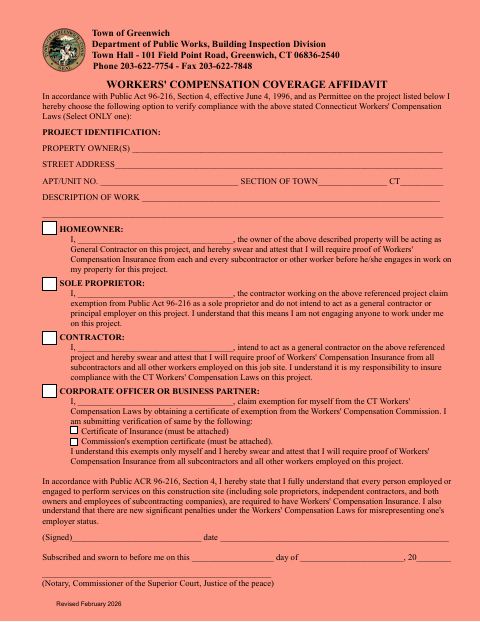
The Town of Greenwich Department of Public Works, Building Inspection Division form identifies the property and proposed work, then asks the permittee to select one coverage option. Depending on the selection, a homeowner or contractor attests to requiring proof of insurance from workers, while a sole proprietor or business representative states an exemption claim. The signer also acknowledges responsibilities and penalties described on the form before submitting it for the project.
Who needs it
A Greenwich building-project permittee who is a homeowner, contractor, sole proprietor, corporate officer, or business partner and must document a coverage option may need this affidavit.
Why it needs a notary
The form has a subscribed-and-sworn-to-before-me block, so the person signing the selected coverage statement must sign and swear before a notary.
How to get this notarized
- 1
Download the Affidavit
Download the Workers' Compensation Coverage Affidavit from the Town of Greenwich.
- 2
Complete the Project Details
Enter the property and work information, then select only one coverage option and complete its statement.
- 3
Book an Online Notary
Arrange an appointment with a commissioned online notary and have the completed affidavit ready.
- 4
Sign on Video
Sign and swear to the selected statement during the online notarization.
- 5
Submit to the Town
Include any required attachment and submit the notarized affidavit with your Greenwich project materials.
Preview the form
The blank PDF straight from Greenwich. Look it over, then upload your filled copy to start the notary session.

You’ll need ID and a webcam.
A licensed online notary will join you on video, verify your government-issued ID, witness your signature, and apply their seal. You’ll receive the notarized PDF by email when the session ends.
Frequently asked questions
- How do I complete the Workers' Compensation Coverage Affidavit?
- Identify the project and property, select only one coverage option, complete the applicable statement, and sign under oath before a notary. Submit the completed affidavit and any required attachments with your project materials.
- Do I need to sign this affidavit in front of a notary?
- Yes. The form includes a subscribed-and-sworn-to-before-me section. The signer of the selected coverage statement must sign and swear before a notary.
- Can I use a commissioned online notary for this form?
- Connecticut authorizes remote online notarization for its own notaries under Public Act 23-28, codified at Conn. Gen. Stat. §3-95b. Conn. Gen. Stat. §1-57 recognizes qualifying notarial acts performed outside Connecticut. Confirm the Town’s submission requirements if unsure.
- What attachments does the affidavit require?
- The business representative option lists a certificate of insurance or the Workers' Compensation Commission's exemption certificate as attachments. The form says the selected verification must be attached; confirm with the town clerk if unsure.
Other forms in Greenwich
Additions and Alterations Building Permit Application
Greenwich
Affidavit of Notification of Appeal
Greenwich
Coastal Site Plan Administrative Application
Greenwich
Commission and Special Permits Application
Greenwich
Demolition Permit Application Package
Greenwich
New Building or Structure Permit Application
Greenwich
Workers' Compensation Coverage Affidavit in other Connecticut cities
Each city publishes its own version of this form. Pick the city where you’re filing.