
Enfield, CT · Hartford County
Administrative Approval Site Plan Review Application
This five-page application collects property, project, applicant, and environmental information for people seeking administrative approval of a site plan in Enfield.
- licensed online notary
- ~15 min average
- Notarized PDF emailed
What you’ll need
- Government-issued photo ID
- Webcam-enabled device (laptop or phone)
- This form, ready to upload as a PDF
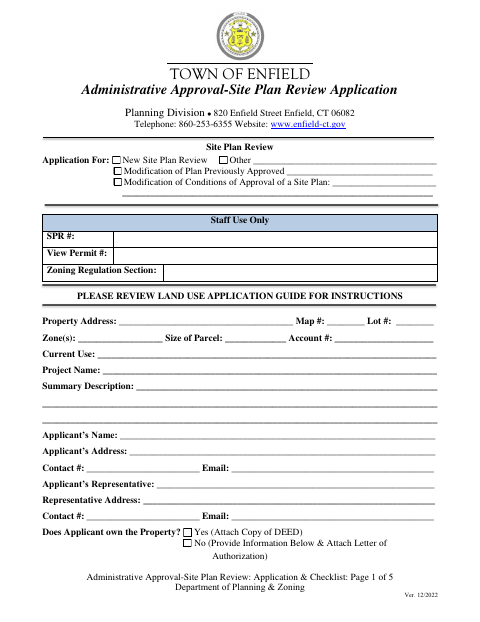
What this form is
Enfield’s Planning Division uses this application to review a proposed site plan, a modification to an approved plan, or a change to site plan approval conditions. Applicants provide property and project details, answer questions about utilities, wetlands, floodplains, and environmental history, and sign a statement affirming that the application materials are true. The accompanying checklist also calls for a notarized application and supporting materials, including an owner authorization letter when the applicant does not own the property.
Who needs it
Applicants seeking administrative site plan approval in Enfield must complete this form and provide the supporting documents listed in the Planning Division checklist.
Why it needs a notary
The form includes an applicant signature and sworn truth statement, but no printed jurat or acknowledgment block; the applicant must sign before a notary.
How to get this notarized
- 1
Download the Application
Get Enfield’s Administrative Approval Site Plan Review Application and review the application and planning checklist.
- 2
Complete the Form
Enter the property, applicant, project, utility, and environmental information, and gather the required supporting materials.
- 3
Book an Online Notary
Schedule a commissioned online notary for the applicant’s signature and truth statement.
- 4
Sign on Video
Sign the application during the online notary session and follow the notary’s instructions.
- 5
Submit to the Town
Send the completed application and checklist materials to Enfield’s Planning Division as directed by the town.
Preview the form
The blank PDF straight from Enfield. Look it over, then upload your filled copy to start the notary session.

You’ll need ID and a webcam.
A licensed online notary will join you on video, verify your government-issued ID, witness your signature, and apply their seal. You’ll receive the notarized PDF by email when the session ends.
Frequently asked questions
- How do I get the Enfield site plan application notarized?
- Complete the application, then sign its truth statement before a commissioned online notary. The checklist also requires supporting documents, so review all submission instructions before filing.
- Do I need to notarize this application?
- Yes. Enfield’s planning checklist lists a complete and notarized application as required information. The applicant signature appears with a statement affirming the application and accompanying papers are true.
- Can I sign this form with an online notary?
- Connecticut authorizes remote online notarization for its notaries under Public Act 23-28, codified at Conn. Gen. Stat. §3-95b, effective October 1, 2023. Conn. Gen. Stat. §1-57 recognizes qualifying acts performed outside Connecticut.
- What supporting documents does the checklist request?
- The checklist calls for an owner authorization letter when the applicant is not the owner, a project narrative, four copies each of interior floor plans and exterior and aerial photos, plus an electronic submission on CD or USB.
- Where should I ask about submitting the application?
- The form identifies the Town of Enfield Planning Division and provides its address and telephone number. For questions about town records or where to direct an inquiry, confirm with the town clerk if unsure.