
Essex, CT · Middlesex County
Workers’ Compensation Coverage Proof
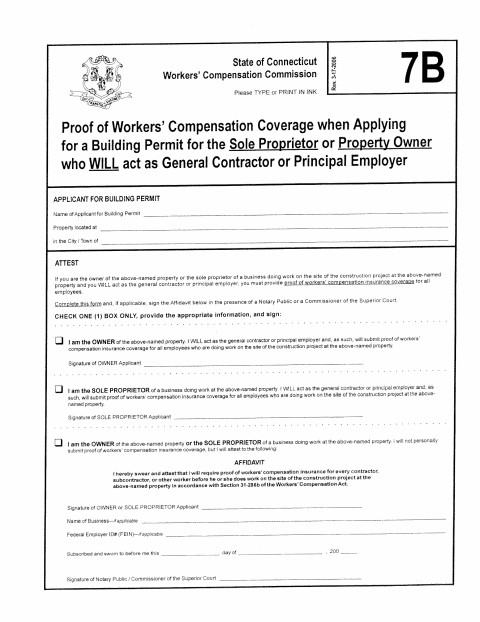
This form documents workers’ compensation coverage or an applicant’s promise to require proof of coverage for work at a property when applying for a building permit.
- licensed online notary
- ~15 min average
- Notarized PDF emailed
What you’ll need
- Government-issued photo ID
- Webcam-enabled device (laptop or phone)
- This form, ready to upload as a PDF
What this form is
The form is for a building-permit applicant who owns the property or is a sole proprietor doing work there and will act as the general contractor or principal employer. The applicant checks the applicable statement: submitting proof of coverage for employees, or attesting that proof will be required from each contractor, subcontractor, or other worker before work begins.
Who needs it
A building-permit applicant who is the property owner or a sole proprietor and will act as general contractor or principal employer must complete the applicable section.
Why it needs a notary
The form includes a subscribed-and-sworn jurat; the owner or sole proprietor applicant signs the affidavit before a notary public or Commissioner of the Superior Court.
How to get this notarized
- 1
Download the Form
Get the State of Connecticut Workers’ Compensation Coverage form for a building-permit application.
- 2
Complete the Form
Type or print in ink, provide the applicant and property information, and check the applicable statement.
- 3
Book an Online Notary
Arrange a remote appointment with a commissioned online notary for the affidavit, if applicable.
- 4
- 5
Submit to the City
Submit the completed form and any required proof of coverage with your building-permit application.
Preview the form
The blank PDF straight from Essex. Look it over, then upload your filled copy to start the notary session.

You’ll need ID and a webcam.
A licensed online notary will join you on video, verify your government-issued ID, witness your signature, and apply their seal. You’ll receive the notarized PDF by email when the session ends.
Frequently asked questions
- Who completes the workers’ compensation form?
- The building-permit applicant completes it if they are the property owner or sole proprietor and will act as the general contractor or principal employer.
- Do I need to sign this form before a notary?
- The affidavit section is sworn and signed before a notary public or Commissioner of the Superior Court. Follow the form’s applicable checkbox instructions.
- How do I get the affidavit notarized online?
- Connecticut permits its notaries to perform remote online notarizations for eligible documents. Book a commissioned online notary, then sign the affidavit during a video session.
- Where do I submit the completed form?
- The form is for use when applying for a building permit. Check with the town about how to submit it and any accompanying proof of coverage; confirm with the town clerk if unsure.
Workers’ Compensation Coverage Proof in other Connecticut cities
Each city publishes its own version of this form. Pick the city where you’re filing.