
Bethany, CT · New Haven County
Statement of Use for Boarding and Riding Equine Facilities
This statement records ownership, property, business, and operating details for a boarding or riding equine facility and is completed by the owner or agent for municipal review.
- licensed online notary
- ~15 min average
- Notarized PDF emailed
What you’ll need
- Government-issued photo ID
- Webcam-enabled device (laptop or phone)
- This form, ready to upload as a PDF
What this form is
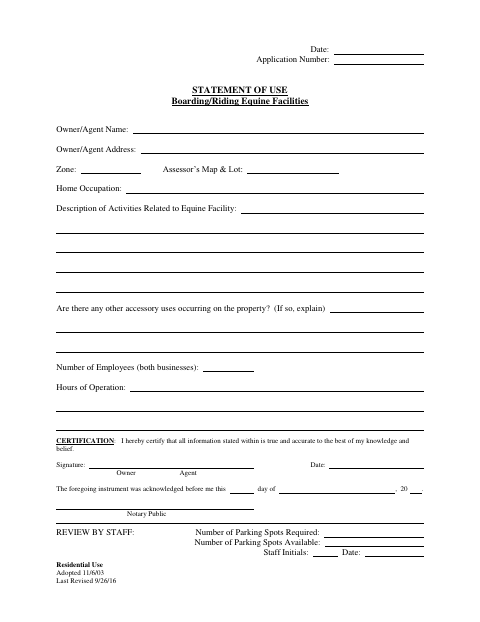
The form documents the owner or agent, property location, equine-facility activities, other accessory uses, employees, and hours of operation. The owner or agent certifies that the information is accurate, and the form includes spaces for staff to review parking requirements and availability. Complete it as part of the application process for a boarding or riding equine facility and submit it for staff review.
Who needs it
An owner or agent completing an application concerning a boarding or riding equine facility should provide the property and business details requested on this statement.
Why it needs a notary
The form has an acknowledgment block stating the instrument was acknowledged before a notary; the owner or agent signs the certification before the notary.
How to get this notarized
- 1
Download the Form
Get the Statement of Use for Boarding/Riding Equine Facilities from Bethany’s form source.
- 2
Complete the Form
Enter the requested owner or agent, property, facility activity, accessory use, employee, and hours information.
- 3
Book an Online Notary
Arrange a remote appointment with a commissioned online notary.
- 4
Sign on Video
Sign the certification during the video appointment and complete the acknowledgment process.
- 5
Submit for Review
Submit the completed statement with the application for municipal staff review.
Preview the form
The blank PDF straight from Bethany. Look it over, then upload your filled copy to start the notary session.

You’ll need ID and a webcam.
A licensed online notary will join you on video, verify your government-issued ID, witness your signature, and apply their seal. You’ll receive the notarized PDF by email when the session ends.
Frequently asked questions
- How do I complete the boarding stables statement?
- Fill in the owner or agent, property, equine-facility activities, accessory uses, employee count, and hours of operation. Sign the certification before a notary, then submit the form for staff review.
- Do I need to sign this form before a notary?
- The form includes an acknowledgment stating the instrument was acknowledged before a notary. The owner or agent should sign the certification in the notary’s presence.
- Can I notarize this form online?
- Connecticut authorizes remote online notarization by its own notaries under Public Act 23-28, codified at Conn. Gen. Stat. §3-95b. Conn. Gen. Stat. §1-57 recognizes certain notarial acts performed outside Connecticut by an officer authorized where the act occurred. Ask the receiving office if unsure.
- Where should I submit the completed statement?
- The form contains a staff review section. Follow the submission instructions for the application, and confirm with the town clerk if unsure.