
Bethany, CT · New Haven County
Business & Industrial Use Statement
This statement records property, owner, applicant, and business details for an application concerning business and industrial use of a property in Bethany.
- licensed online notary
- ~15 min average
- Notarized PDF emailed
What you’ll need
- Government-issued photo ID
- Webcam-enabled device (laptop or phone)
- This form, ready to upload as a PDF
What this form is
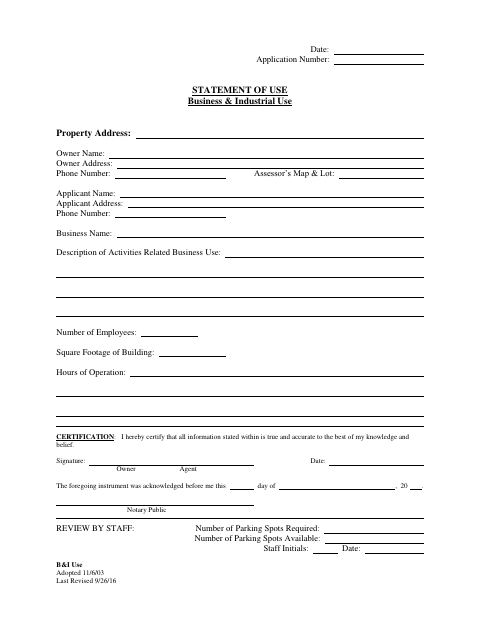
The form collects the property address, owner and applicant contact details, business name, activity description, employee count, building square footage, and hours of operation. The owner or agent certifies that the information is true and accurate, and the form includes a staff review section for required and available parking. The form does not state when an application is required.
Who needs it
An owner or agent completing an application concerning business and industrial use of a property can use this form to provide the requested details and certification.
Why it needs a notary
The form has an acknowledgment-before-me block; the owner or agent whose signature is presented on the certification signs before a notary.
How to get this notarized
- 1
Download the Statement
Get the Business & Industrial Use Statement from the Town of Bethany.
- 2
Fill In the Form
Enter the property, owner, applicant, and business information requested, then review the certification.
- 3
Book an Online Notary
Schedule an online notarization appointment for the acknowledgment section.
- 4
Sign on Video
Sign the certification during the video appointment before the commissioned online notary.
- 5
Submit to the City
Submit the completed statement for staff review.
Preview the form
The blank PDF straight from Bethany. Look it over, then upload your filled copy to start the notary session.

You’ll need ID and a webcam.
A licensed online notary will join you on video, verify your government-issued ID, witness your signature, and apply their seal. You’ll receive the notarized PDF by email when the session ends.
Frequently asked questions
- How do I get the Business & Industrial Use Statement notarized?
- Complete the form, book an online appointment, and sign during the video session before a commissioned online notary. Submit the completed statement for staff review.
- Do I need to sign this statement before a notary?
- The form includes an acknowledgment-before-me section and a notary public line. The owner or agent should sign before a notary completes the acknowledgment.
- Can I use online notarization for this form in Connecticut?
- Connecticut authorizes remote online notarization by its notaries under Public Act 23-28, codified at Conn. Gen. Stat. §3-95b, effective October 1, 2023.
- Where do I submit the completed statement?
- The form includes a staff review section for parking information. Ask the relevant Bethany office where to submit it; confirm with the town clerk if unsure.