
Seymour, CT · New Haven County
Civilian Complaint Report
The Seymour Police Department Civilian Complaint Report lets a person submit an account of an incident involving department personnel, with identifying details, witness information, and supporting materials.
- licensed online notary
- ~15 min average
- Notarized PDF emailed
What you’ll need
- Government-issued photo ID
- Webcam-enabled device (laptop or phone)
- This form, ready to upload as a PDF
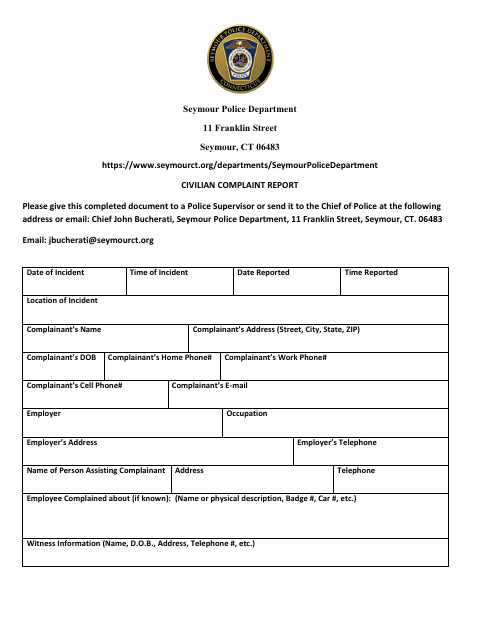
What this form is
Use this three-page form to report an incident involving Seymour Police Department personnel. It asks for incident and complainant details, information about the employee and any witnesses, answers to safety and language-assistance questions, and a description of what happened. The form directs complainants to give the completed document to a police supervisor or send it to the Chief of Police, and provides space for complaint-receipt details.
Who needs it
A person submitting a complaint about an incident involving Seymour Police Department personnel can use this report to provide details and supporting documentation.
Why it needs a notary
The form carries an acknowledgment before an undersigned officer acting as notary; the complainant personally appears and acknowledges signing the complaint.
How to get this notarized
- 1
Download The Report
Get the Seymour Police Department Civilian Complaint Report from the city’s website.
- 2
Complete The Form
Provide incident, complainant, employee, and witness details; answer the listed questions and attach supporting materials as appropriate.
- 3
Book An Online Notary
Arrange a session with a commissioned online notary, and confirm with the department whether it will accept remote notarization for this officer acknowledgment.
- 4
Sign On Video
Follow the notary’s instructions for appearing and acknowledging your signature during the online session.
- 5
Submit To The Department
Give the completed report to a police supervisor or send it to the Chief of Police as instructed on the form.
Preview the form
The blank PDF straight from Seymour. Look it over, then upload your filled copy to start the notary session.

You’ll need ID and a webcam.
A licensed online notary will join you on video, verify your government-issued ID, witness your signature, and apply their seal. You’ll receive the notarized PDF by email when the session ends.
Frequently asked questions
- How do I submit the completed civilian complaint report?
- The form says to give it to a police supervisor or send it to the Chief of Police at the Seymour Police Department address provided. It also lists an email address for the Chief.
- Do I need to sign the report before a notary?
- The form’s acknowledgment says the complainant must personally appear before the undersigned officer and acknowledge signing. It identifies the notary as an officer and asks for rank, name, and ID number; check with the department before using a different notary.
- Can a commissioned online notary notarize this complaint?
- Connecticut authorizes remote online notarization for its own notaries under Public Act 23-28, effective October 1, 2023. The form specifies an acknowledgment before an officer and requests that officer’s rank, name, and ID, so confirm with the Seymour Police Department whether it will accept a remotely notarized version.
- What should I attach to my complaint?
- The form invites supporting documentation, including letters, emails, photographs, and video or audio tapes. It also says to attach additional pages if needed to describe the incident.
- Where can I confirm the correct place to submit it?
- The form directs you to a police supervisor or the Chief of Police. Contact the Seymour Police Department with questions about submission; confirm with the town clerk if unsure about municipal record routing.
Civilian Complaint Report in other Connecticut cities
Each city publishes its own version of this form. Pick the city where you’re filing.