
Preston, CT · New London County
Affidavit of Personal Property Status
Preston business owners use this sworn affidavit to report whether a business was never started, sold, moved, or terminated for the October 1 Grand List.
- licensed online notary
- ~15 min average
- Notarized PDF emailed
What you’ll need
- Government-issued photo ID
- Webcam-enabled device (laptop or phone)
- This form, ready to upload as a PDF
What this form is
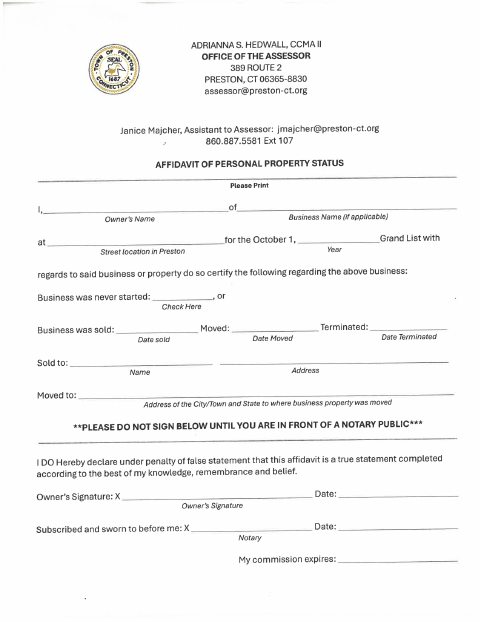
The affidavit records a business’s status and, if it was sold, moved, or terminated, asks for the relevant date and related buyer or new-location details. Preston’s Assessor’s Office uses the form for information about a business or property at a street location in Preston in connection with the October 1 Grand List. The owner declares the information true to the best of their knowledge, remembrance, and belief.
Who needs it
A business owner completing the form for a Preston street location should use it to report whether the business was never started, sold, moved, or terminated.
Why it needs a notary
The owner signs the declaration under penalty of false statement before a notary; the form’s notarial block says it was subscribed and sworn to before the notary.
How to get this notarized
- 1
Download the Affidavit
Get the Affidavit of Personal Property Status from Preston’s document center.
- 2
Fill In the Business Details
Print the owner and business information, October 1 Grand List year, and Preston street location; mark the applicable status and provide related details.
- 3
Book an Online Notary
Arrange an online notarization appointment before signing the affidavit.
- 4
Sign on Video
Sign the owner declaration while in the commissioned online notary’s presence by video.
- 5
Submit to the Assessor
Contact Preston’s Office of the Assessor about submitting the completed affidavit.
Preview the form
The blank PDF straight from Preston. Look it over, then upload your filled copy to start the notary session.

You’ll need ID and a webcam.
A licensed online notary will join you on video, verify your government-issued ID, witness your signature, and apply their seal. You’ll receive the notarized PDF by email when the session ends.
Frequently asked questions
- How do I complete and submit the affidavit?
- Fill in the owner and business details, select the applicable status, and complete any related dates or sale or move information. Sign before a notary, then contact Preston’s Assessor’s Office about submitting the form.
- Do I need to wait to sign the affidavit?
- Yes. The form says not to sign until you are in front of a notary. The owner’s declaration is subscribed and sworn to before the notary.
- Can I use online notarization for this affidavit?
- Connecticut authorizes remote online notarization by its own notaries under Public Act 23-28, codified at Conn. Gen. Stat. §3-95b, effective October 1, 2023. Conn. Gen. Stat. §1-57 recognizes certain notarial acts performed outside Connecticut.
- Where do I send the completed form?
- The form lists the Preston Office of the Assessor. Contact that office about filing; confirm with the town clerk if unsure.