
Stonington, CT · New London County
Local Vendor Preference Affidavit
This affidavit lets a company certify its Stonington office, employee and management presence, and tax and utility payment status when seeking local vendor preference.
- licensed online notary
- ~15 min average
- Notarized PDF emailed
What you’ll need
- Government-issued photo ID
- Webcam-enabled device (laptop or phone)
- This form, ready to upload as a PDF
What this form is
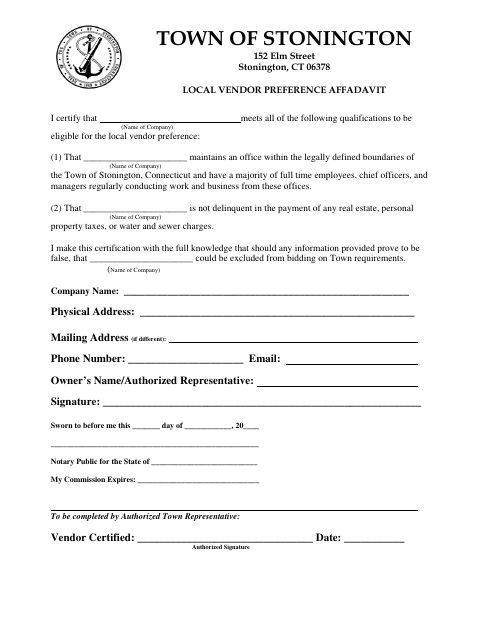
The form asks a company to certify that it maintains an office within Stonington’s boundaries, has a majority of its full-time employees, chief officers, and managers regularly working from those offices, and is current on listed taxes and water and sewer charges. A company provides its contact and representative details and signs the sworn certification when seeking local vendor preference; an authorized Town representative completes the vendor certification section.
Who needs it
A company seeking Stonington’s local vendor preference should complete the form and certify that it meets the stated office, staffing, and payment qualifications.
Why it needs a notary
The form carries a jurat beginning “Sworn to before me”; the company’s owner or authorized representative signs the certification before the notary.
How to get this notarized
- 1
Download the Form
Download Stonington’s Local Vendor Preference Affidavit.
- 2
Fill In Company Details
Enter the company’s name, addresses, contact information, and owner or authorized representative details.
- 3
Book an Online Notary
Schedule a session with a commissioned online notary.
- 4
Sign on Video
Sign the sworn certification during the notary’s video session.
- 5
Submit to the Town
Submit the notarized form to the Town following its instructions.
Preview the form
The blank PDF straight from Stonington. Look it over, then upload your filled copy to start the notary session.

You’ll need ID and a webcam.
A licensed online notary will join you on video, verify your government-issued ID, witness your signature, and apply their seal. You’ll receive the notarized PDF by email when the session ends.
Frequently asked questions
- How do I get the Local Vendor Preference Affidavit notarized?
- Complete the company information, book a commissioned online notary, and sign the sworn certification during the video session. Submit the notarized form to the Town as directed.
- Do I need to sign the affidavit in front of a notary?
- Yes. The form includes a “Sworn to before me” jurat, so the owner or authorized representative signs the certification before the notary.
- Can I use an online notary for this Stonington form?
- Connecticut authorizes remote online notarization for its own notaries under Public Act 23-28, codified at Conn. Gen. Stat. §3-95b, effective October 1, 2023. Confirm that the Town will accept your completed form.
- Where do I submit the completed affidavit?
- The form includes a section for an authorized Town representative to certify the vendor. Follow the Town’s submission instructions; confirm with the town clerk if unsure.