
Fort Oglethorpe, GA · Catoosa County
Land Subdivision Approval Application
This application requests preliminary or final land subdivision approval and is filed by a property owner or applicant seeking to subdivide property in Fort Oglethorpe.
- licensed online notary
- ~15 min average
- Notarized PDF emailed
What you’ll need
- Government-issued photo ID
- Webcam-enabled device (laptop or phone)
- This form, ready to upload as a PDF
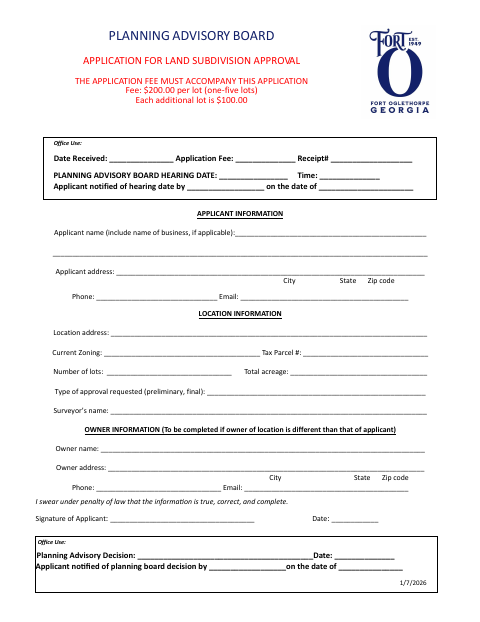
What this form is
Use this application to request preliminary or final approval for a land subdivision, providing applicant, property, zoning, parcel, lot, acreage, and surveyor information. File it by the fifth of the month to be considered for the following month’s Planning Advisory Board meeting, with the required fee, property description, plat, and supporting forms. The board makes a recommendation to the City Council, which makes the final decision; attendance at both meetings is strongly encouraged.
Who needs it
Property owners and applicants seeking preliminary or final land subdivision approval in Fort Oglethorpe must submit this application and the required supporting materials.
Why it needs a notary
The owner authorization has a Notary Public Certification, and the campaign contribution disclosure has a sworn-and-subscribed jurat; owners and applicants sign the applicable forms before the notary.
How to get this notarized
- 1
Download The Application
Download the Land Subdivision Approval Application and review its application instructions and checklist.
- 2
Fill In The Application
Enter applicant and property details, select preliminary or final approval, and prepare the required supporting materials.
- 3
Book An Online Notary
Book a video session with a commissioned online notary for the owner authorization and campaign contribution disclosure forms.
- 4
Sign On Video
Sign the applicable forms in front of the notary during the online session.
- 5
Submit To The City
File the completed application, notarized forms, supporting materials, and fee with the City of Fort Oglethorpe by the fifth of the month.
Preview the form
The blank PDF straight from Fort Oglethorpe. Look it over, then upload your filled copy to start the notary session.

You’ll need ID and a webcam.
A licensed online notary will join you on video, verify your government-issued ID, witness your signature, and apply their seal. You’ll receive the notarized PDF by email when the session ends.
Frequently asked questions
- How do I get the land subdivision forms notarized online?
- Complete the required fields without signing, then book a session with a commissioned online notary. Sign the owner authorization and campaign contribution disclosure during the video session, as applicable.
- Do I need a separate notarized form for each property owner?
- Yes. The application instructions say each property owner must complete a separate Property Owner Authorization page and Disclosure of Campaign Contributions form, signed by the owner and applicant and notarized.
- Can a commissioned online notary notarize these forms for Georgia use?
- Georgia has no remote online notarization statute of its own; Georgia law recognizes acknowledgments taken by notaries of other states (O.C.G.A. §44-2-21). Confirm with the city if unsure.
- What supporting items does the application checklist require?
- The checklist names a written legal description, a plat, campaign contribution disclosure, owner authorization, filing-fee payment, and digital and printed plans or drawings if applicable.
Other forms in Fort Oglethorpe
Alcoholic Beverage License Application
Fort Oglethorpe
Planning Advisory Board Annexation Application
Fort Oglethorpe
Historic Overlay Compliance Application
Fort Oglethorpe
Planned Mixed Use Zoning District Application
Fort Oglethorpe
Stormwater Maintenance Agreement
Fort Oglethorpe
Application for Zoning Amendment
Fort Oglethorpe