
Brookhaven, GA · DeKalb County
Occupational Tax Penalties, Conditions, and Certification
This one-page certification explains occupational tax penalties and certificate conditions, and is completed by applicants seeking a Brookhaven business occupational tax certificate.
- licensed online notary
- ~15 min average
- Notarized PDF emailed
What you’ll need
- Government-issued photo ID
- Webcam-enabled device (laptop or phone)
- This form, ready to upload as a PDF
What this form is
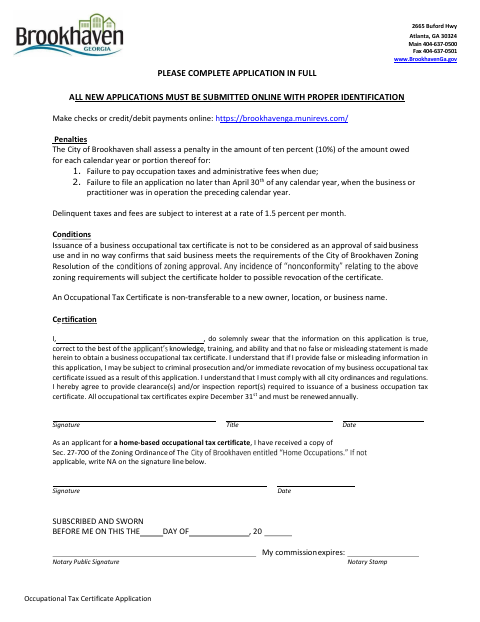
This form sets out penalties for late occupational tax payments or applications, explains conditions attached to an occupational tax certificate, and contains the applicant’s sworn certification. Brookhaven requires applicants to complete the application in full and submit new applications online with proper identification. The applicant also certifies that the information is true, understands the consequences of false statements, and agrees to comply with city ordinances and provide required clearances or inspection reports.
Who needs it
A business owner or practitioner applying for a Brookhaven occupational tax certificate should complete this certification as part of the application.
How to get this notarized
- 1
Download the Form
Get the Penalties, Conditions, and Certification form from Brookhaven’s document page.
- 2
Complete the Application
Complete the application in full and review the penalties, certificate conditions, and sworn certification.
- 3
Book an Online Notary
Arrange an appointment with a commissioned online notary and check with the city if you are unsure whether it accepts online notarization.
- 4
Sign Before the Notary
Sign the certification during the notarial session so the notary can complete the subscribed-and-sworn block.
- 5
Submit to the City
Submit the new application online with proper identification, as directed by Brookhaven.
Preview the form
The blank PDF straight from Brookhaven. Look it over, then upload your filled copy to start the notary session.

You’ll need ID and a webcam.
A licensed online notary will join you on video, verify your government-issued ID, witness your signature, and apply their seal. You’ll receive the notarized PDF by email when the session ends.
Frequently asked questions
- How do I complete this occupational tax certification?
- Complete the application in full, review the penalties and conditions, then sign the certification before a notary. Brookhaven says new applications must be submitted online with proper identification.
- Do I need to sign this form in front of a notary?
- Yes. The form includes a subscribed-and-sworn-before-me block, with spaces for the notary’s signature, commission expiration, and stamp.
- Can I use a commissioned online notary for this sworn form?
- Georgia has no remote online notarization statute of its own and recognizes acknowledgments taken by notaries of other states. Because this form requires a sworn jurat, confirm with the city if unsure.
- What does the certification say I agree to?
- The applicant swears the application information is true, acknowledges possible prosecution or certificate revocation for false or misleading information, and agrees to comply with city rules and provide required clearances or inspection reports.