
Brookhaven, GA · DeKalb County
Penalties, Conditions, and Certification Form
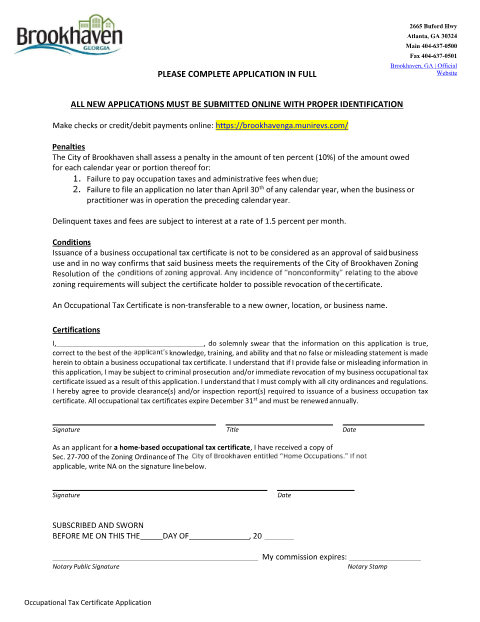
The sworn certification page of Brookhaven's business Occupational Tax Certificate application, in which the applicant attests the submitted information is true.
- licensed online notary
- ~15 min average
- Notarized PDF emailed
What you’ll need
- Government-issued photo ID
- Webcam-enabled device (laptop or phone)
- This form, ready to upload as a PDF
What this form is
Alongside the SAVE and E-Verify affidavits, Brookhaven requires applicants for an Occupational Tax Certificate to sign this certification acknowledging the city's penalty and non-transferability rules and swearing that the application is accurate. The certification page ends with a notary block for the applicant's sworn signature.
Who needs it
Anyone applying for or renewing a Brookhaven Occupational Tax Certificate (business license).
Why it needs a notary
The form ends 'SUBSCRIBED AND SWORN BEFORE ME' with lines for the notary's commission expiration and stamp, so it must be signed under oath before a notary.
How to get this notarized
- 1
Download the Form
Get the Penalties, Conditions, and Certification Form from Brookhaven's business licensing page.
- 2
Fill In Applicant Details
Enter your name, title, and business information.
- 3
Book an Online Notary
Schedule a remote online notarization session.
- 4
Sign on Video
Sign the sworn certification before the notary on a live video call.
- 5
Submit to the City
Include the notarized form with your Occupational Tax Certificate application.
Preview the form
The blank PDF straight from Brookhaven. Look it over, then upload your filled copy to start the notary session.

You’ll need ID and a webcam.
A licensed online notary will join you on video, verify your government-issued ID, witness your signature, and apply their seal. You’ll receive the notarized PDF by email when the session ends.
Frequently asked questions
- How do I notarize the Brookhaven certification form online?
- Complete the applicant and business details, then meet an online notary by video to sign the sworn certification before submitting your Occupational Tax Certificate application.
- Do I need a notary for this certification form?
- Yes, the form ends with a subscribed-and-sworn-before-me block requiring a notary's signature, commission expiration, and stamp.
- What information does this form certify?
- It certifies that the applicant's business license information is true, that they understand the penalty rules, and that the license is non-transferable.
- Can I complete this with an online notary instead of visiting City Hall?
- Yes, remote online notarization lets you sign this certification from anywhere; check with the city if unsure whether they accept it for your filing.