
Brookhaven, GA · DeKalb County
Pouring Permit Application
This application is for individuals seeking a Brookhaven pouring permit to handle, sell, or serve alcohol as a manager, supervisor, or off-premises alcohol beverage caterer employee.
- licensed online notary
- ~15 min average
- Notarized PDF emailed
What you’ll need
- Government-issued photo ID
- Webcam-enabled device (laptop or phone)
- This form, ready to upload as a PDF
What this form is
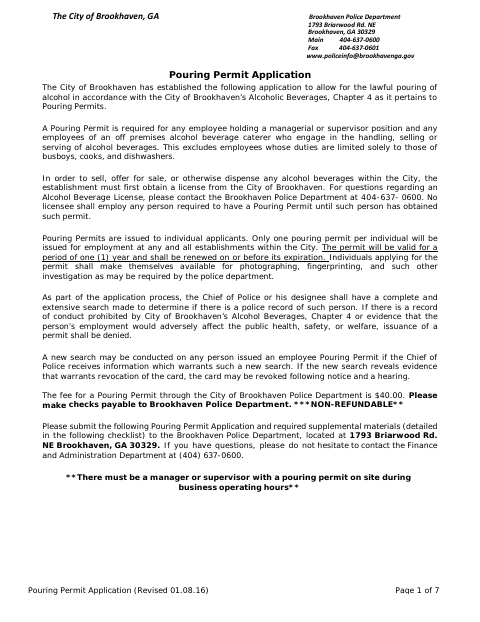
The seven-page application collects personal, employment, and background information and includes consent for a criminal background check. Brookhaven requires a pouring permit for managers or supervisors and for employees of off-premises alcohol beverage caterers who handle, sell, or serve alcohol, with limited exceptions. The applicant must submit the notarized certification, supporting materials, and nonrefundable fee to the Brookhaven Police Department; the form also requires photographing and fingerprinting by the department.
Who needs it
Individuals applying for a Brookhaven pouring permit because they are managers, supervisors, or off-premises alcohol beverage caterer employees who handle, sell, or serve alcohol need this form.
Why it needs a notary
The applicant’s certification on page six has a sworn-and-attested jurat; the applicant signs and swears to the statements before the notary.
How to get this notarized
- 1
Download the Application
Get the City of Brookhaven Pouring Permit Application and review its checklist and instructions.
- 2
Complete the Form
Fill in the applicant, contact, employment, and background information, and prepare required supplemental materials.
- 3
Book an Online Notary
Schedule an online notarization for the applicant’s certification on page six.
- 4
Sign on Video
Sign and swear to the certification before a commissioned online notary during the video session.
- 5
Submit to the City
Submit the completed application and required materials to the Brookhaven Police Department, following the city’s instructions.
Preview the form
The blank PDF straight from Brookhaven. Look it over, then upload your filled copy to start the notary session.

You’ll need ID and a webcam.
A licensed online notary will join you on video, verify your government-issued ID, witness your signature, and apply their seal. You’ll receive the notarized PDF by email when the session ends.
Frequently asked questions
- How do I get the certification notarized?
- Complete the application, then book an online session with a commissioned online notary. Sign and swear to the certification on page six during the video session, and follow the City’s instructions for submitting the full application.
- Do I need to sign the application in front of a notary?
- The checklist identifies the applicant’s certification as notarized. The sworn-and-attested jurat on page six is for the applicant’s signature and oath before a notary.
- Can I use an online notary for this form in Georgia?
- Georgia has no remote online notarization statute of its own. Georgia law recognizes acknowledgments taken by notaries of other states (O.C.G.A. §44-2-21); this form has a jurat, so confirm with the city if unsure.
- What else must I submit with the application?
- The checklist includes a signed background check authorization, a current driver’s license copy, payment of the $40 nonrefundable fee, and a city background check and photograph. Arrest and conviction information may also be required, if applicable.