
Tucker, GA · DeKalb County
Business Tax Amendment Form
Existing Tucker businesses use this form to amend reported gross receipts or employee counts for a business license.
What this form is
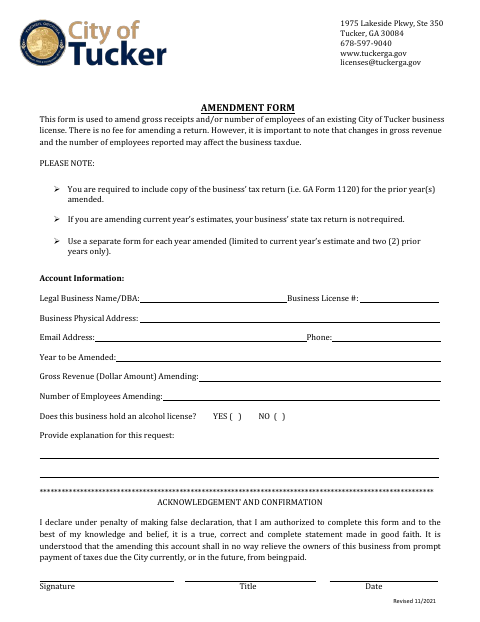
This form lets an existing Tucker business amend its reported gross receipts, number of employees, or both for a business license. Use a separate form for each year amended, limited to the current-year estimate and two prior years. Attach the business’s tax return for each prior year amended; a state tax return is not required when amending current-year estimates. Changes may affect business tax due, but there is no amendment fee.
Who needs it
An existing Tucker business seeking to amend gross receipts or its employee count reported for a business license needs this form.
How to submit it
Submit it to the city department named on the form; check the city website for current contact details.
About notarization
This document is signed and dated without a notary; the signer just signs and dates it, and no notarized or sworn attachment is specified.
How to submit this form
- 1
Download The Form
Download the Business Tax Amendment Form.
- 2
Complete The Form
Enter the business and account information, year amended, amended gross receipts or employee count, and an explanation.
- 3
Gather Attachments
For each prior year amended, include a copy of the business’s tax return. Current-year estimate amendments do not require a state tax return.
- 4
Sign And Date
The authorized signer completes the acknowledgement by providing a signature, title, and date.
- 5
Submit To The City
Submit the completed form to the city department named on it; check the city website for current contact details.
Frequently asked questions
- What does the Business Tax Amendment Form change?
- It lets an existing business amend the gross receipts, number of employees, or both reported for its Tucker business license.
- What supporting documents are required?
- For each prior year amended, include a copy of the business’s tax return. A state tax return is not required when amending current-year estimates.
- Do I need a notary for the Business Tax Amendment Form?
- No. The form is signed and dated without a notary, and it specifies no notarized or sworn attachment.
- How do I submit the Business Tax Amendment Form?
- Submit it to the city department named on the form; check the city website for current contact details.
Need something notarized?
This Business Tax Amendment Form doesn’t need a notary — but if you have another Tucker form that does, a commissioned online notary can help.