
Sugar Hill, GA · Gwinnett County
Gas Tap and Meter Installation Request
This two-page request collects appliance load and property details for a gas tap and meter installation or upgrade, and is completed by a homeowner or the owner’s authorized agent.
- licensed online notary
- ~15 min average
- Notarized PDF emailed
What you’ll need
- Government-issued photo ID
- Webcam-enabled device (laptop or phone)
- This form, ready to upload as a PDF
What this form is
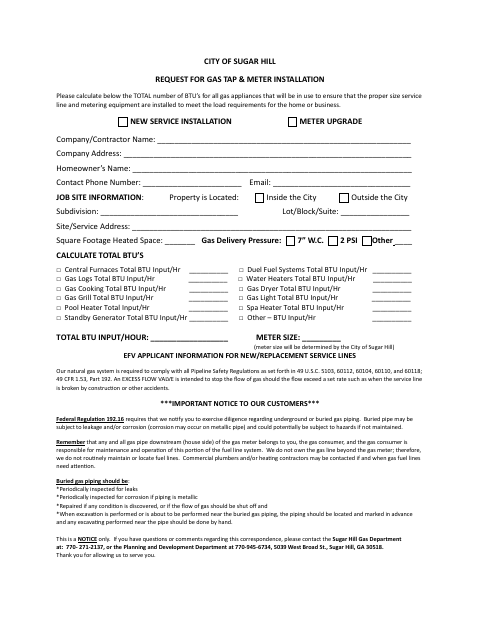
Use this form to request a new gas service installation or meter upgrade and provide the property, contact, and gas-appliance BTU information the city uses to determine appropriate metering equipment. The agreement also addresses utility installation, access, payment responsibility, and the owner’s grant of an easement for gas service equipment. The form states that required site preparation and other listed steps must be completed before the city installs a new service.
Who needs it
A homeowner or the homeowner’s legally authorized agent seeking a new gas service installation or meter upgrade at a Sugar Hill property should complete this form.
Why it needs a notary
The form includes a Notary Public designation beside the owner or owner’s agent signature; that signer signs the agreement before the notary.
How to get this notarized
- 1
Download The Form
Get the City of Sugar Hill request for gas tap and meter installation.
- 2
Complete The Request
Provide the owner, contractor, contact, and site details; select the service request and list appliance BTU inputs.
- 3
Book An Online Notary
Arrange a session with a commissioned online notary and ask about the form’s Notary Public signature area.
- 4
Sign On Video
Sign the agreement before the notary during your online session.
- 5
Submit To The City
Send the completed form to the city and contact the Utility Department to schedule the installation.
Preview the form
The blank PDF straight from Sugar Hill. Look it over, then upload your filled copy to start the notary session.

You’ll need ID and a webcam.
A licensed online notary will join you on video, verify your government-issued ID, witness your signature, and apply their seal. You’ll receive the notarized PDF by email when the session ends.
Frequently asked questions
- How do I complete the gas tap and meter installation request?
- Enter the property and contact details, indicate whether you need a new service or meter upgrade, and calculate the BTU input for the listed appliances. Sign the agreement before a notary, then contact the city to schedule installation.
- Do I need to sign this form before a notary?
- The form’s signature area includes a Notary Public designation beside the owner or owner’s agent signature. Sign in the notary’s presence and complete the notary portion.
- Can I use an online notary for this form?
- Georgia has no remote online notarization statute of its own, but Georgia law recognizes acknowledgments taken by notaries of other states (O.C.G.A. §44-2-21). Ask a commissioned online notary about the form and confirm with the city if unsure.
- What should be ready before the city installs gas service?
- The form says the yard must be within six inches of final grade and clear for a trencher, the applicant’s fuel line must be stubbed out, and underground utilities or structures must be located. It also asks applicants to notify the Utility Department 15 days before the requested installation date.