
Sugar Hill, GA · Gwinnett County
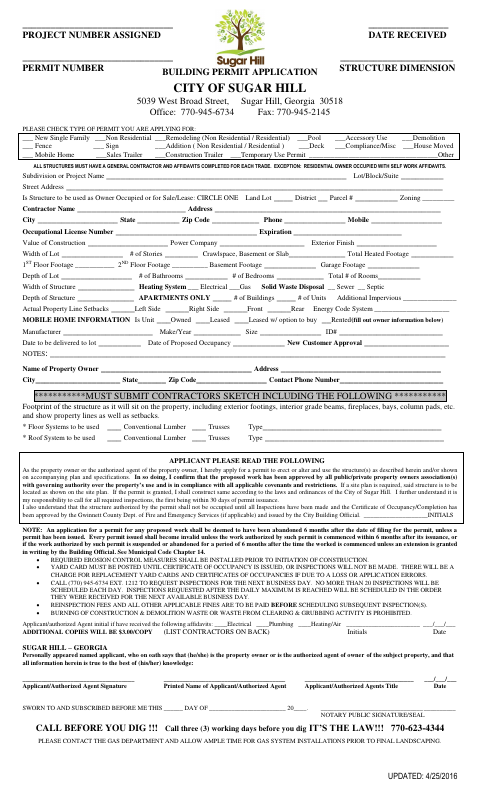
General Building Permit Application
Sugar Hill property owners or their authorized agents use this application to request a building permit and provide project, property, contractor, and construction details to the City.
- licensed online notary
- ~15 min average
- Notarized PDF emailed
What you’ll need
- Government-issued photo ID
- Webcam-enabled device (laptop or phone)
- This form, ready to upload as a PDF
What this form is
The application covers permit types ranging from new construction and remodeling to pools, decks, signs, and mobile homes. Applicants provide project and property information, acknowledge permit conditions, and complete applicable sections and supporting requirements; the form also includes erosion-control and solid-waste acknowledgments. The City’s instructions list additional plans, approvals, contractor affidavits, and other materials that may be required depending on the project.
Who needs it
A property owner or the owner’s authorized agent applying to Sugar Hill for a building permit for a structure or project described on the form needs this application.
How to get this notarized
- 1
Download The Application
Get the General Building Permit Application from the City of Sugar Hill.
- 2
Complete The Applicable Sections
Enter project, property, owner, and contractor details, and review the instructions and supporting requirements for your permit type.
- 3
Book An Online Notary
Schedule an online session with a commissioned online notary for the application’s sworn jurat.
- 4
Sign Under Oath On Video
Appear for the video session and sign when directed by the notary, who completes the jurat.
- 5
Submit The Application
Send the notarized application and required project materials to the City of Sugar Hill as directed.
Preview the form
The blank PDF straight from Sugar Hill. Look it over, then upload your filled copy to start the notary session.

You’ll need ID and a webcam.
A licensed online notary will join you on video, verify your government-issued ID, witness your signature, and apply their seal. You’ll receive the notarized PDF by email when the session ends.
Frequently asked questions
- How do I get the Sugar Hill permit application notarized online?
- Complete the application, then book a session with a commissioned online notary. Sign under oath during the video session, and follow the City’s instructions for submitting the application and supporting materials.
- Do I need to sign the application in front of a notary?
- Yes. The application includes a jurat stating that the applicant appeared and swore the information is true to the best of their knowledge. The applicant or authorized agent signs before the notary.
- Will Sugar Hill accept an online-notarized jurat?
- Georgia has no remote online notarization statute of its own. Georgia law recognizes acknowledgments taken by notaries of other states (O.C.G.A. §44-2-21), but this form calls for a sworn jurat; confirm with the city if unsure.
- What should I submit with the application?
- Requirements vary by project. The form lists items such as contractor sketches, scaled drawings, plans, approvals, and trade affidavits. Review the applicable instructions on the application and check with the City about your project.