
Gainesville, GA · Hall County
Individual Landmark Designation Application
This application requests local historic designation for an individual Gainesville property; property owners and applicants submit it to the City of Gainesville Community Development Department with supporting materials.
- licensed online notary
- ~15 min average
- Notarized PDF emailed
What you’ll need
- Government-issued photo ID
- Webcam-enabled device (laptop or phone)
- This form, ready to upload as a PDF
What this form is
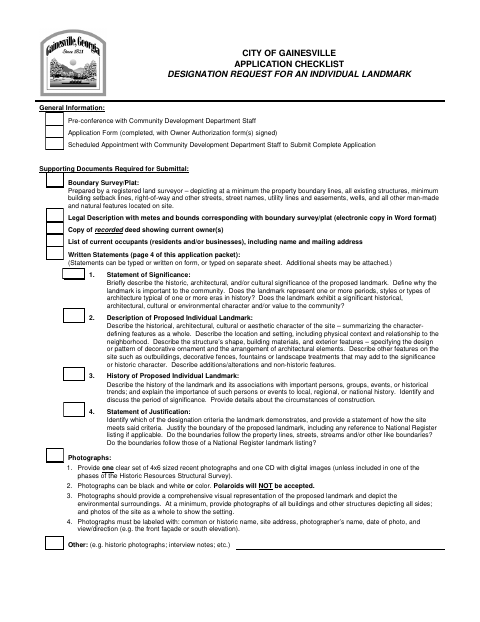
Use this application to ask Gainesville to designate an individual property as a local historic landmark. The packet calls for a pre-conference and scheduled appointment with Community Development staff, along with a survey, legal description, deed, occupant list, photographs, research materials, and written statements. Each property owner should complete an authorization form; the application checklist warns that missing items may delay processing.
Who needs it
Property owners seeking individual landmark designation, and applicants authorized by those owners, submit this packet and supporting documents to Gainesville Community Development.
Why it needs a notary
The owner authorization carries a Notary Public certification stating the applicant swears the information is true; the applicant signs before the notary.
How to get this notarized
- 1
Download The Application
Download Gainesville’s individual landmark designation application and review its checklist and owner authorization.
- 2
Complete The Form
Fill in the application and prepare the required supporting documents. Have each property owner complete an authorization if there are multiple owners.
- 3
Book An Online Notary
Schedule an online appointment with a commissioned online notary for the applicant’s owner-authorization signature.
- 4
Sign On Video
Sign the applicant signature before the notary during the video appointment and complete the sworn certification.
- 5
Submit To The City
Attend the scheduled appointment with Community Development staff to submit the complete application and supporting documents.
Preview the form
The blank PDF straight from Gainesville. Look it over, then upload your filled copy to start the notary session.

You’ll need ID and a webcam.
A licensed online notary will join you on video, verify your government-issued ID, witness your signature, and apply their seal. You’ll receive the notarized PDF by email when the session ends.
Frequently asked questions
- How do I notarize the owner authorization?
- Complete the authorization details, then sign the applicant signature in front of a commissioned online notary during your video appointment. The form says the applicant swears the information is true and correct.
- Do I need every property owner to complete an authorization?
- The form says to duplicate the authorization for an individual site with multiple property owners and have each owner complete a portion and provide a notarized signature.
- Can a commissioned online notary notarize this form?
- Georgia has no remote online notarization statute of its own; Georgia law recognizes acknowledgments taken by notaries of other states under O.C.G.A. §44-2-21. This form uses a sworn certification, so confirm with the city if unsure.
- What else must I submit with the application?
- The checklist calls for a boundary survey or plat, legal description, recorded deed, occupant list, labeled photographs, written statements, and other supporting research materials.
Other forms in Gainesville
Homeowner Building (Owner-Builder) Affidavit
Gainesville
Power (Electrical Service Connection) Affidavit
Gainesville
Variance Application Property Owner Notary Certification
Gainesville
Certificate of Appropriateness Application
Gainesville
Change of Contractor Letter
Gainesville
Perpetual Easement for Private Water Service Line
Gainesville