
Maui County, HI · Maui County
Odometer Correction Statement
The Odometer Correction Statement documents a vehicle mileage-recording error and is filed with Maui County’s Division of Motor Vehicles and Licensing by the seller responsible for the error.
- licensed online notary
- ~15 min average
- Notarized PDF emailed
What you’ll need
- Government-issued photo ID
- Webcam-enabled device (laptop or phone)
- This form, ready to upload as a PDF
What this form is
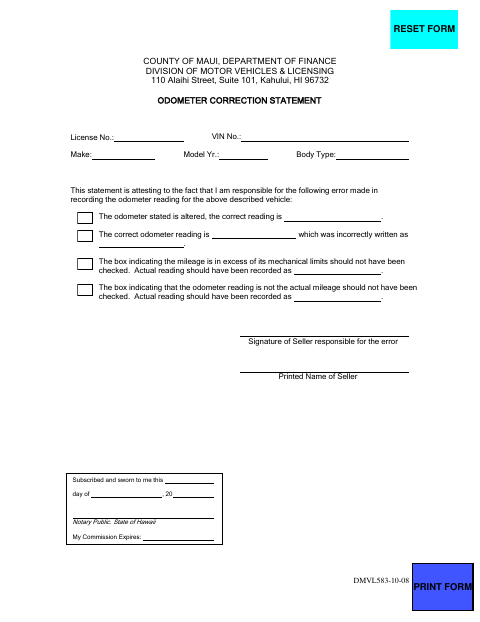
This one-page form identifies a vehicle and lets the seller responsible for a recording error state the correct odometer reading. It also addresses errors involving altered readings or incorrectly marked mileage boxes. The seller completes and signs the statement, then submits it to the Maui County Department of Finance, Division of Motor Vehicles and Licensing, for its vehicle records.
Who needs it
A seller responsible for an odometer-reading error on a vehicle record submits this statement to Maui County’s Division of Motor Vehicles and Licensing.
Why it needs a notary
The form has a “Subscribed and sworn to me” jurat; the seller responsible for the error signs the statement before the notary.
How to get this notarized
- 1
Download the Form
Get the Odometer Correction Statement from Maui County’s document center.
- 2
Complete the Vehicle Details
Fill in the license number, VIN, make, model year, body type, and information about the odometer error.
- 3
Book an Online Notary
Arrange a session with a commissioned online notary and have the unsigned form ready.
- 4
Sign on Video
Sign the statement during the online session so the notary can complete the jurat.
- 5
Submit to Maui County
Send the completed statement to the Maui County Division of Motor Vehicles and Licensing.
Preview the form
The blank PDF straight from Maui County. Look it over, then upload your filled copy to start the notary session.

You’ll need ID and a webcam.
A licensed online notary will join you on video, verify your government-issued ID, witness your signature, and apply their seal. You’ll receive the notarized PDF by email when the session ends.
Frequently asked questions
- How do I complete the Odometer Correction Statement?
- Enter the vehicle details and the correct odometer reading, identify the recording error, and sign the statement before a notary. Submit the completed form to Maui County’s Division of Motor Vehicles and Licensing.
- Do I need to sign this form in front of a notary?
- Yes. The form includes a “Subscribed and sworn to me” jurat. The seller responsible for the error signs before the notary, who completes the notarial certificate.
- Can I use remote online notarization for this form?
- Hawaii permits remote online notarization by a commissioned online notary. The notary must first hold an active commission and obtain a separate remote online commission from the Department of the Attorney General.
- Where do I submit the completed statement?
- The form is for Maui County’s Department of Finance, Division of Motor Vehicles and Licensing. Confirm the submission method or any additional requirements with the county if unsure.