
Wheaton, IL · DuPage County
Massage Business License Applicant and New Manager Application
This application collects background, employment, and conviction information from a massage business license applicant or a proposed new manager seeking to work for a licensed massage business.
- licensed online notary
- ~15 min average
- Notarized PDF emailed
What you’ll need
- Government-issued photo ID
- Webcam-enabled device (laptop or phone)
- This form, ready to upload as a PDF
What this form is
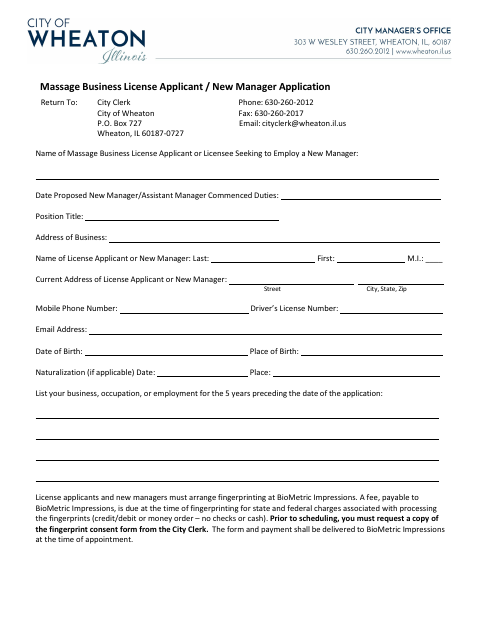
Use this form when applying as a massage business license applicant or when a licensee seeks to employ a new manager or assistant manager. It requests personal and work history, answers about specified convictions and licensing matters, and includes an affirmation that the information is true and complete. Applicants and new managers must also arrange fingerprinting through BioMetric Impressions after requesting the fingerprint consent form from the City Clerk.
Who needs it
A massage business license applicant or licensee proposing a new manager or assistant manager should complete this application for the City Clerk.
Why it needs a notary
The acknowledgment has a jurat with “subscribed and sworn to before me”; the applicant, owner, or manager signing the certification must swear to it before the notary.
How to get this notarized
- 1
Download the Application
Get the massage business license applicant or new manager application from the City of Wheaton.
- 2
Complete the Form
Fill in the applicant and business details, employment history, conviction and licensing answers, and any required explanations or attachments.
- 3
Book an Online Notary
Arrange a remote notarization for the applicant, owner, or manager who will make the sworn certification.
- 4
Sign on Video
Meet with a commissioned online notary by video and sign the certification as directed during the session.
- 5
Submit to the City
Return the completed application to the City Clerk and follow the form’s fingerprinting instructions.
Preview the form
The blank PDF straight from Wheaton. Look it over, then upload your filled copy to start the notary session.

You’ll need ID and a webcam.
A licensed online notary will join you on video, verify your government-issued ID, witness your signature, and apply their seal. You’ll receive the notarized PDF by email when the session ends.
Frequently asked questions
- How do I submit the completed application?
- Return the application to the City Clerk using the contact information printed on the form. The form also instructs applicants and new managers to arrange fingerprinting at BioMetric Impressions.
- Do I need to sign this application before a notary?
- Yes. The applicant, owner, or manager certifies that the information is true and correct, and the form provides a “subscribed and sworn to before me” jurat.
- Can I use a commissioned online notary?
- Illinois authorizes electronic and remote notarization for its own notaries under the Notary Public Act (5 ILCS 312) and recognizes notarial acts performed outside Illinois by an officer authorized where the act takes place (765 ILCS 30). Confirm with the city or village if unsure.
- What should I do before scheduling fingerprinting?
- Request a copy of the fingerprint consent form from the City Clerk before scheduling. The form and payment for fingerprint processing are to be delivered to BioMetric Impressions at the appointment.
Other forms in Wheaton
Administrative Zoning Variation Application
Wheaton
Petition for Annexation
Wheaton
Class F Liquor License Application
Wheaton
Going-Out-of-Business, Removal or Damaged Goods Sale Application
Wheaton
Group Care Home License Application
Wheaton
Lawn Irrigation Construction, Use and Indemnification Agreement
Wheaton