
Montgomery, IL · Kane County
Temporary Liquor License Application
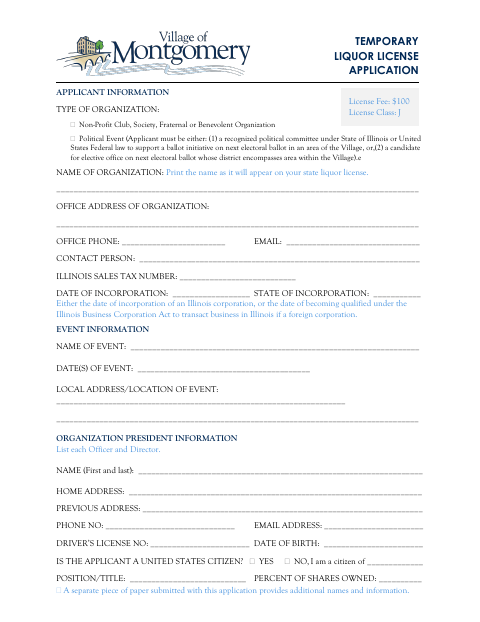
This application requests a temporary liquor license for an eligible organization or political event, and is filed by the applicant with the Village of Montgomery.
- licensed online notary
- ~15 min average
- Notarized PDF emailed
What you’ll need
- Government-issued photo ID
- Webcam-enabled device (laptop or phone)
- This form, ready to upload as a PDF
What this form is
The application collects organization, event, officer or director, and background information for a temporary liquor license. It asks the applicant to swear or affirm that the statements are true and to agree to follow applicable laws and Village ordinances. The form says to submit the completed, signed, notarized application with proof of dram shop liability insurance and identification copies for each person listed; fingerprinting is scheduled after submission.
Who needs it
An eligible nonprofit organization or political event applicant seeking a temporary liquor license in Montgomery must complete and submit this application.
Why it needs a notary
The form has a subscribed-and-sworn jurat; the applicant signs before the notary, with corporate applications sworn by the president and partnership applications by two members.
How to get this notarized
- 1
Download the Application
Get the Temporary Liquor License Application from the Village of Montgomery.
- 2
Complete the Form
Fill in the organization, event, officer or director, and background information requested.
- 3
Book an Online Notary
Arrange an online notary appointment for the applicant oath and signature.
- 4
Sign on Video
Take the oath and sign the application during the notary video session.
- 5
Submit to the Village
Submit the completed notarized application with the insurance proof and identification copies listed on the form.
Preview the form
The blank PDF straight from Montgomery. Look it over, then upload your filled copy to start the notary session.

You’ll need ID and a webcam.
A licensed online notary will join you on video, verify your government-issued ID, witness your signature, and apply their seal. You’ll receive the notarized PDF by email when the session ends.
Frequently asked questions
- Who signs the temporary liquor license application?
- The applicant signs the sworn statement. The form specifies that a corporation’s president swears to and signs the application, with the secretary attesting and signing; two partnership members swear to and sign.
- Do I need to submit anything besides the notarized application?
- Yes. The form lists proof of dram shop liability insurance and a copy of a valid driver’s license or state ID for each person listed. It says fingerprinting is scheduled after submission.
- How do I complete the oath for this application online?
- Illinois authorizes its notaries to perform electronic and remote notarizations. A commissioned online notary can administer the oath by video; because the form requests an original signed, notarized application, confirm with the city or village if unsure.
- What information does the application request?
- It asks for organization and event details, information about officers and directors, and answers about prior license denials or revocations and specified background matters.
Temporary Liquor License Application in other Illinois cities
Each city publishes its own version of this form. Pick the city where you’re filing.