
Illiopolis, IL · Sangamon County
Annual Treasurer’s Report
The Annual Treasurer’s Report summarizes Village of Illiopolis fund balances, revenues, expenditures, and compensation for the fiscal year, and is signed under oath by the village treasurer.
- licensed online notary
- ~15 min average
- Notarized PDF emailed
What you’ll need
- Government-issued photo ID
- Webcam-enabled device (laptop or phone)
- This form, ready to upload as a PDF
What this form is
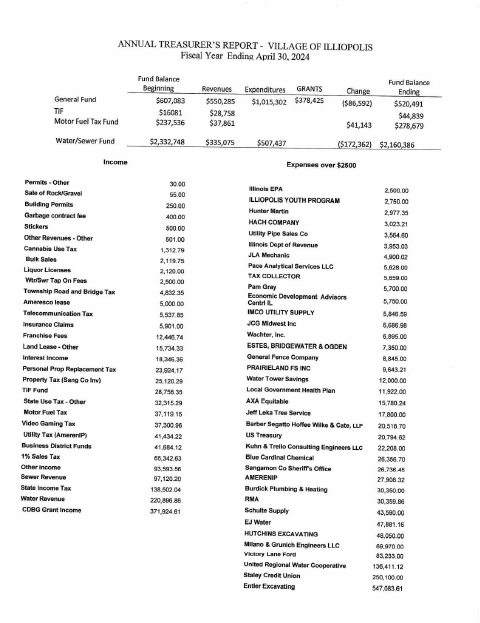
This report presents the Village of Illiopolis’s fund balances, revenues, expenditures, selected income and expenses, and compensation information for the fiscal year ending April 30, 2024. It includes the treasurer’s sworn statement that the information is true and accurate, a clerk’s filing notation, and a newspaper publisher’s certificate of publication. The form text shows the report filed with the village clerk and published in The Sentinel.
Who needs it
The Village of Illiopolis treasurer signs the report’s sworn attestation; the report also includes a clerk’s filing notation and a newspaper publisher’s certificate of publication.
Why it needs a notary
The treasurer signs the sworn attestation in the jurat, which states the report was subscribed and sworn to before a notary public.
How to get this notarized
- 1
Download the Report
Get the Annual Treasurer’s Report and review its fiscal-year figures and sworn attestation.
- 2
Complete the Report
Fill in any required information and leave the treasurer’s signature for the notary session.
- 3
Book an Online Notary
Schedule an online session for the treasurer who must swear to the report.
- 4
Sign on Video
The treasurer signs the sworn attestation during the video session as directed by the notary.
- 5
Submit to the Village
After notarization, follow the village’s instructions for submitting the report and completing any publication or filing steps.
Preview the form
The blank PDF straight from Illiopolis. Look it over, then upload your filled copy to start the notary session.

You’ll need ID and a webcam.
A licensed online notary will join you on video, verify your government-issued ID, witness your signature, and apply their seal. You’ll receive the notarized PDF by email when the session ends.
Frequently asked questions
- How do I get the treasurer’s attestation notarized?
- Complete the report, then book an online session with a commissioned online notary. The treasurer signs the sworn attestation during the video session.
- Do I need to sign the report before meeting the notary?
- The treasurer must sign the sworn attestation before the notary. Wait to sign that section until the notary gives instructions during the online session.
- Can this report be notarized online?
- Illinois authorizes electronic and remote notarization by its notaries under the Illinois Notary Public Act (5 ILCS 312), and recognizes notarial acts performed outside Illinois by an officer authorized where the act takes place (765 ILCS 30). Confirm with the city or village if unsure.
- What information does the report contain?
- The report includes fund balances, revenues, expenditures, selected income and expenses, a compensation summary, and the treasurer’s sworn statement.
Annual Treasurer’s Report in other Illinois cities
Each city publishes its own version of this form. Pick the city where you’re filing.