
Okawville, IL · Washington County
Business and Raffle License Application
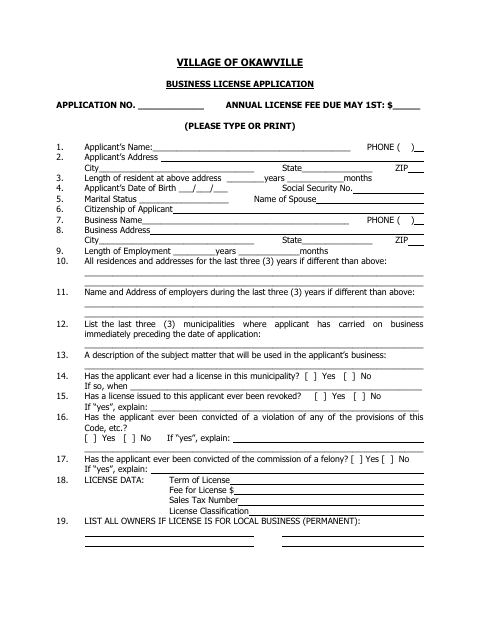
This six-page form combines an Okawville business license application with a raffle license application and sworn statement for applicants and organization officers.
- licensed online notary
- ~15 min average
- Notarized PDF emailed
What you’ll need
- Government-issued photo ID
- Webcam-enabled device (laptop or phone)
- This form, ready to upload as a PDF
What this form is
The form collects applicant, residence, employment, business, and license details, along with information about a raffle, its organization, officers, prizes, sales area, and drawing. Applicants use the relevant sections to request a business license or a single or multiple raffle license from the Village of Okawville. The form states that raffle application fees are nonrefundable even if the Village Board rejects the application.
Who needs it
People applying for an Okawville business license and not-for-profit organization officers seeking a single or multiple raffle license should complete the applicable sections.
Why it needs a notary
The raffle license sworn statement has a jurat: the presiding officer and secretary sign and swear to the organization’s not-for-profit character before a notary public.
How to get this notarized
- 1
Download the Application
Get the Village of Okawville business and raffle license application.
- 2
Complete the Applicable Sections
Fill in the business or raffle details requested; include a separate sheet with dates, times, and locations for multiple raffles.
- 3
Book an Online Notary
Arrange a commissioned online notary for the raffle sworn statement, if using remote notarization.
- 4
Sign on Video
The presiding officer and secretary sign and swear to the statement before the notary.
- 5
Submit to the Village
Submit the completed application and any required separate sheet to the Village of Okawville.
Preview the form
The blank PDF straight from Okawville. Look it over, then upload your filled copy to start the notary session.

You’ll need ID and a webcam.
A licensed online notary will join you on video, verify your government-issued ID, witness your signature, and apply their seal. You’ll receive the notarized PDF by email when the session ends.
Frequently asked questions
- How do I complete the raffle license sworn statement?
- The form asks the organization’s presiding officer and secretary to attest to its not-for-profit character. Both sign and swear to the statement before a notary public.
- Do I need to notarize the business license application?
- The notary block appears in the raffle license sworn statement, not the business license application section. The presiding officer and secretary sign that statement before a notary.
- Can I sign the sworn statement with a remote online notary?
- Illinois law authorizes electronic and remote notarization by its own notaries and recognizes notarial acts by officers authorized where the act occurs. Ask Okawville whether it accepts a remotely notarized version; confirm with the city or village if unsure.
- What information does the raffle application request?
- It requests organization and officer details, raffle type, prize values, ticket price, sales area and period, and the drawing date, time, and location. Multiple raffle requests also require event details on a separate sheet.