
Dillsboro, IN · Dearborn County
Non-Collusion Affidavit
This affidavit states that a bidder or agent did not collude on a public-works bid, and is completed and filed by the bidder or agent representing the organization.
- licensed online notary
- ~15 min average
- Notarized PDF emailed
What you’ll need
- Government-issued photo ID
- Webcam-enabled device (laptop or phone)
- This form, ready to upload as a PDF
What this form is
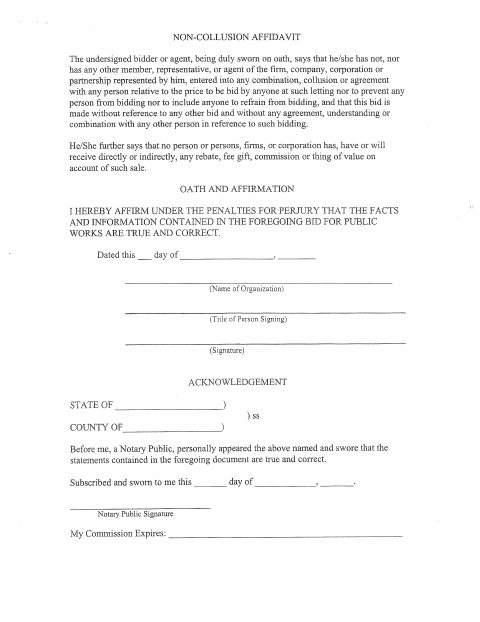
The affidavit states that the bidder or agent did not coordinate the bid price, prevent others from bidding, or agree with others about bidding, and that no one will receive a rebate, fee, gift, commission, or other thing of value connected with the sale. It also affirms that information in the public-works bid is true and correct. The form includes spaces for the organization, signer, date, and notarial acknowledgment.
Who needs it
A bidder or agent representing an organization completes this affidavit in connection with a bid for public works.
Why it needs a notary
The form has an acknowledgment stating that the signer appeared before the notary and swore the statements are true; the named bidder or agent signs before the notary.
How to get this notarized
- 1
Download the Affidavit
Download the Non-Collusion Affidavit from the City of Dillsboro.
- 2
Fill In the Bidder Details
Complete the organization, title, signature, and date details. Do not sign until directed by the notary.
- 3
Book an Online Notary
Schedule an appointment with a commissioned online notary.
- 4
Sign on Video
Appear for the video session and swear to the affidavit before signing as directed by the notary.
- 5
Submit to the City
Submit the notarized affidavit with your public-works bid as directed by the city.
Preview the form
The blank PDF straight from Dillsboro. Look it over, then upload your filled copy to start the notary session.

You’ll need ID and a webcam.
A licensed online notary will join you on video, verify your government-issued ID, witness your signature, and apply their seal. You’ll receive the notarized PDF by email when the session ends.
Frequently asked questions
- How do I get this affidavit notarized online?
- Complete the bidder and organization details, then book a commissioned online notary. Sign during the video session when instructed, and submit the notarized affidavit with your bid.
- Do I need to sign the affidavit before meeting the notary?
- The form says the signer appeared before the notary and swore the statements were true. Wait to sign until the notary directs you during the appointment.
- Can I use an online notary for this form?
- Indiana authorizes remote online notarization for its notaries through a remote notary public endorsement. A notarial act performed by a notary public or other authorized officer of another state is also recognized under IC 33-42-9-8.
- What should I do after notarization?
- Submit the completed affidavit with your public-works bid as directed by the city. If you are unsure about submission requirements, confirm with the city or town if unsure.