
Lawrence, IN · Marion County
Owner Consent for Zoning Applications
This form lets a property owner authorize another person to file land development or zoning petitions for the property with Lawrence’s Board of Zoning Appeals or for administrative approval.
- licensed online notary
- ~15 min average
- Notarized PDF emailed
What you’ll need
- Government-issued photo ID
- Webcam-enabled device (laptop or phone)
- This form, ready to upload as a PDF
What this form is
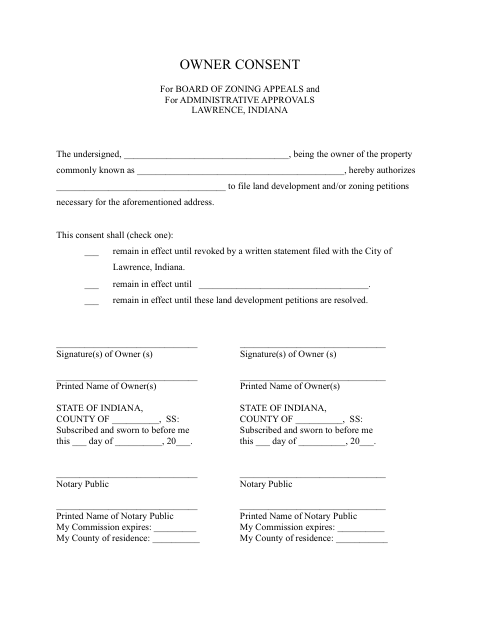
The Owner Consent form records a property owner’s authorization for a named person to file land development and/or zoning petitions for the stated property. The owner selects how long the consent remains in effect: until revoked by a written statement filed with the City, until a specified date or event, or until the petitions are resolved. Lawrence uses this consent for Board of Zoning Appeals matters and administrative approvals.
Who needs it
A property owner who wants another person to file land development or zoning petitions for the property with Lawrence needs to complete this consent.
Why it needs a notary
The form carries a subscribed-and-sworn jurat, and each signing property owner must sign before the notary.
How to get this notarized
- 1
Download The Form
Get the Owner Consent form for Lawrence zoning applications.
- 2
Fill In The Form
Enter the property owner, property address, authorized filer, and selected consent duration.
- 3
Book An Online Notary
Arrange a session with a commissioned online notary.
- 4
Sign On Video
Sign the form before the notary during your online session.
- 5
Submit To The City
File the notarized consent with the City of Lawrence for the related zoning or administrative approval matter.
Preview the form
The blank PDF straight from Lawrence. Look it over, then upload your filled copy to start the notary session.

You’ll need ID and a webcam.
A licensed online notary will join you on video, verify your government-issued ID, witness your signature, and apply their seal. You’ll receive the notarized PDF by email when the session ends.
Frequently asked questions
- How do I complete this owner consent form?
- Identify the property and the person authorized to file petitions, choose how long the consent stays in effect, then sign before a notary and submit the form to the City.
- Do I need to sign this form in front of a notary?
- Yes. The form includes a section stating that it was subscribed and sworn to before a notary, with space for the notary’s name, commission expiration, and county of residence.
- Can I use an online notary for this form?
- Indiana authorizes remote online notarization for notaries with a remote notary public endorsement under IC 33-42-17; the statute took effect July 1, 2019, and the endorsement took effect July 1, 2020. Confirm with the city or town if unsure.
- How long does the owner’s consent remain in effect?
- The owner can choose to keep it in effect until written revocation is filed with the City, until a specified date or event, or until the land development petitions are resolved.