
Lawrence, IN · Marion County
Petition for Approval
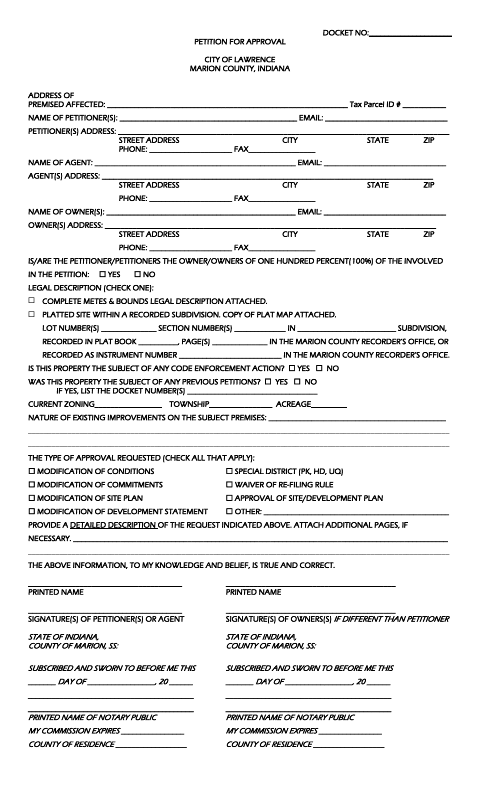
This petition collects property, ownership, and request details from people seeking approval for a Lawrence property, including the petitioner or agent and, when different, the property owner.
- licensed online notary
- ~15 min average
- Notarized PDF emailed
What you’ll need
- Government-issued photo ID
- Webcam-enabled device (laptop or phone)
- This form, ready to upload as a PDF
What this form is
Use this form to describe the property, identify its owners and petitioner or agent, and state the approval being requested. It asks for parcel and legal-description information, existing improvements, zoning, and whether code enforcement or prior petitions are involved. The form lists requests such as site-plan approval and modifications to conditions, commitments, or development plans; provide a detailed explanation and attach the requested plat map or legal description when applicable.
Who needs it
Petitioners seeking an approval listed on the form should provide the property and request details, with owner information and signatures when the owners differ from the petitioners.
Why it needs a notary
The form has separate Indiana county jurats for petitioners or their agent and, if different, the owners; each signer completes the applicable section before the notary.
How to get this notarized
- 1
Download the Form
Get the City of Lawrence Petition for Approval form.
- 2
Fill In the Details
Provide property, petitioner, agent, and owner information, select the requested approval, and describe the request.
- 3
Attach Supporting Documents
Attach the applicable metes-and-bounds description or recorded plat map, plus any additional request details.
- 4
Book an Online Notary
Arrange remote notarization for the applicable petitioner or owner jurat section.
- 5
Sign on Video
Sign the appropriate section in the online notary's presence during your video session.
- 6
Submit to the City
Submit the completed petition and attachments using the city's filing instructions.
Preview the form
The blank PDF straight from Lawrence. Look it over, then upload your filled copy to start the notary session.

You’ll need ID and a webcam.
A licensed online notary will join you on video, verify your government-issued ID, witness your signature, and apply their seal. You’ll receive the notarized PDF by email when the session ends.
Frequently asked questions
- How do I complete the Petition for Approval?
- Enter the property, petitioner, agent, and owner details; select the approval requested; describe it; and attach the applicable legal description or plat map. Sign the appropriate jurat section before the notary.
- Do I need to attach a legal description or plat map?
- The form asks you to select either a complete metes-and-bounds legal description or a platted site within a recorded subdivision and attach the corresponding document.
- Can I sign this form with a commissioned online notary?
- Indiana authorizes its notaries to perform remote online notarizations with a remote notary public endorsement. A commissioned online notary can notarize the applicable jurat by video.
- Where do I submit the completed petition?
- The form identifies the City of Lawrence and includes a docket number field, but does not give submission instructions. Confirm the filing method and any attachments with the city or town if unsure.