
Olathe, KS · Johnson County
Ownership and Agent Authorization Affidavit
This affidavit identifies individual, couple, partnership, or corporate property owners in Olathe and authorizes an agent to submit applications involving their property.
- licensed online notary
- ~15 min average
- Notarized PDF emailed
What you’ll need
- Government-issued photo ID
- Webcam-enabled device (laptop or phone)
- This form, ready to upload as a PDF
What this form is
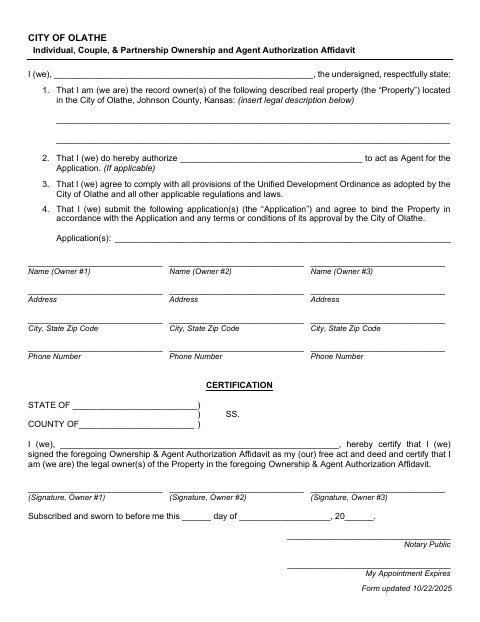
The affidavit identifies the record owner of real property in Olathe, provides the property’s legal description, and can authorize an agent to act for an application. Owners also certify that they will comply with applicable regulations and agree to bind the property to the application and its approval conditions. The form provides separate certification sections for individual, couple, or partnership owners and for a corporation, and is submitted with the application it describes.
Who needs it
Property owners named in an Olathe application may use this affidavit, including individuals, couples, partnerships, or corporations, and can authorize an agent to act for the application.
How to get this notarized
- 1
Download the Affidavit
Get the Olathe Ownership and Agent Authorization Affidavit and choose the section that fits the property owner.
- 2
Fill In the Form
Enter the owner and property details, legal description, application information, and any agent authorization. Leave signatures blank.
- 3
Book an Online Notary
Schedule a session with a commissioned online notary and have identification ready.
- 4
Sign on Video
The required owner or corporate officers sign and swear to the affidavit during the video session.
- 5
Submit to the City
Submit the notarized affidavit with the application it describes.
Preview the form
The blank PDF straight from Olathe. Look it over, then upload your filled copy to start the notary session.

You’ll need ID and a webcam.
A licensed online notary will join you on video, verify your government-issued ID, witness your signature, and apply their seal. You’ll receive the notarized PDF by email when the session ends.
Frequently asked questions
- How do I get this Olathe ownership affidavit notarized online?
- Complete the form without signing, then book a session with a commissioned online notary. Sign and swear to the affidavit during the video session, and submit it with your application.
- Do I need to sign the affidavit in front of a notary?
- Yes. The form says it must be subscribed and sworn to before a notary. Individual owners sign, or the corporation’s president and secretary sign on its behalf.
- Can a commissioned online notary notarize this affidavit?
- Kansas law authorizes remote online notarization by a commissioned online notary under K.S.A. 53-5a15. The notary will guide you through signing and swearing to the affidavit on video.
- When should I submit the affidavit with my Olathe application?
- The form connects the affidavit to the application and its approval conditions. Check your application instructions for submission timing, and confirm with the city if unsure.